Blogger gets $8 Ox64 RISC-V board talking over serial, not yet running Linux
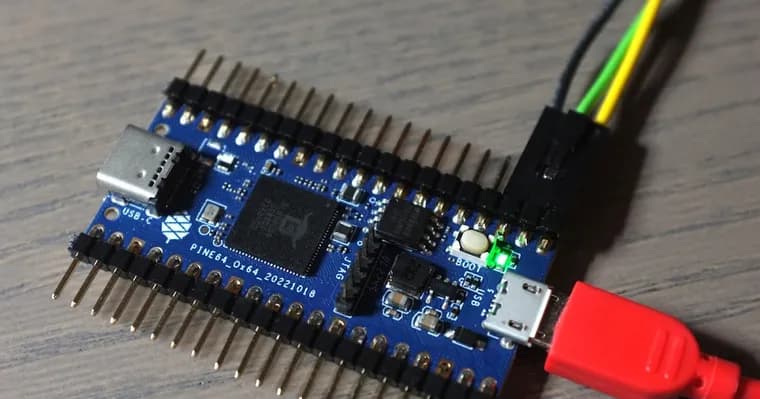
The post opens with a bold claim: for $8 you can run Linux on a RISC-V computer. The author says this is not a stripped-down kernel without an MMU, because the Ox64 has capable RISC-V cores, and not just one but three, all different. He warns up front that at the time of writing ethernet, wifi and SD-Card do not work. The board looks like a microcontroller but behaves like a UNIX machine, he writes, and getting it running is far from trivial.
He then lists six hurdles. First, the Ox64 cannot be programmed over USB the way an Arduino, ESP32, Stamp-C3 or rPi Pico can; it has to be programmed through the UART TX/RX pins, which he hooked up to GPIO14, GPIO15 and ground. Second, the flashing tool Dev Cube crashes on launch on Ubuntu under Wayland, and the author says you have to switch to Xorg. The pasted log ends in a GLib error about a missing 'antialiasing' key and a core dump.
Third, a CH340G USB-serial dongle bought on Amazon did not work: the handshake failed in Dev Cube every time. He then notes that some people found the board can be programmed with an RP2040 device such as the rPi Pico, and he used an Adafruit KB2040 he had lying around. Fourth, that meant turning the KB2040 into a serial bridge between the PC and the Ox64. RP2040 GPIO-4 goes to Ox64 GPIO-15, RP2040 GPIO-5 goes to Ox64 GPIO-14, and the grounds are connected. The RP2040 is loaded with picoprobe by holding BOOT while powering up and feeding it the uf2 file.
Fifth, Dev Cube still could not flash the Ox64 even with the bridge, but the command-line bflb-mcu-tool can. Sixth, that tool had to be modified before it worked: the author stripped the DTR and RTS handling from bflb_interface_uart.py in his Python 3.10 site-packages directory, and links his copy of the file.
With the Ox64 powered via MicroUSB and the RP2040 connected to his PC over USB-C, he flashed low_load_bl808_m0.bin, taken from the bl808 linux guide, using bflb-mcu-tool with chipname bl808, port /dev/ttyACM2 and a baudrate of 2000000. The board then printed, through the KB2040, a heap size of 156 Kbyte, 'E907 start...', 'mtimer clk:1000000' and 'psram clk init ok!'.
The author calls this a modest start, but the Ox64 is now talking to his PC. Linux is not running yet. As he understands it, he still has to flash something to the D0 core and then flash the actual OS. He invites readers to come back to see whether he manages it. The page carries a note that a Part 2 now exists.
Key facts
- The Ox64 is a $8 board with three different RISC-V cores that the author says can run Linux with an MMU, not just a stripped-down kernel.
- At the time of writing, ethernet, wifi and SD-Card do not work on the board.
- Getting it flashed took six hurdles: no USB programming, a Dev Cube crash on Ubuntu with Wayland, a failing CH340G dongle, building an RP2040 serial bridge, Dev Cube failing to flash, and a patch to bflb-mcu-tool.
- After flashing low_load_bl808_m0.bin at baudrate 2000000, the board printed boot output including 'heap size = 156 Kbyte'.
- Linux is not running yet; the author still needs to flash something to the D0 core and then the OS.
Why it matters
A Linux-capable RISC-V board for $8 is a striking price point, and the author stresses that its cores are capable ones, not a no-MMU microcontroller setup. The post is a record of how much friction sits between that promise and a working system: the board is programmed only over UART, and the vendor tool does not do the job.
Who it affects
Hobbyists and tinkerers who want a cheap RISC-V board that behaves like a UNIX machine. The details are most useful to anyone who owns an Ox64 and has an RP2040 board, such as a rPi Pico or an Adafruit KB2040, on hand.
How to use it
The author's route: wire a UART bridge from an RP2040 (GPIO-4 to Ox64 GPIO-15, GPIO-5 to Ox64 GPIO-14, grounds joined), load the RP2040 with picoprobe by holding BOOT at power-up and feeding it the uf2 file, patch bflb-mcu-tool to strip DTR and RTS handling, then flash low_load_bl808_m0.bin with bflb-mcu-tool. Power the Ox64 over MicroUSB and connect the RP2040 to the PC over USB-C. If you use Dev Cube on Ubuntu, switch from Wayland to Xorg.
How solid is it
This is a first-hand account with pasted commands and boot output, so the steps reflect what the author actually did. It is one person's setup (Ubuntu, Python 3.10, a KB2040), and it ends before Linux boots, so the headline claim of running Linux for $8 is not demonstrated in this post.
Risks and caveats
The author warns that ethernet, wifi and SD-Card do not work at the time of writing, and says it is good to know this before jumping in. Flashing needs a patched tool and a spare RP2040 board, and a common CH340G dongle failed for him. Steps still ahead include flashing the D0 core and the OS, and he leaves open whether he will manage it.
“Ok, a modest start, but the Ox64 is talking to my PC now!”
— The post's author