datasette-llm 0.1a11 adds OpenAI-compatible endpoints for local models
Simon Willison has published a new release of datasette-llm, the intermediate plugin for Datasette that handles configuring LLMs for use by other Datasette plugins. The release is dated 14 November 2026.
The change is support for OpenAI-compatible endpoints. In practice, you can now configure Datasette to use an LLM hosted anywhere that speaks the OpenAI protocol, which Willison calls a pseudo-standard web protocol. That includes models you run yourself: the post names LM Studio, Ollama and llama.cpp, noting that llama.cpp has just hit v1.0.0.
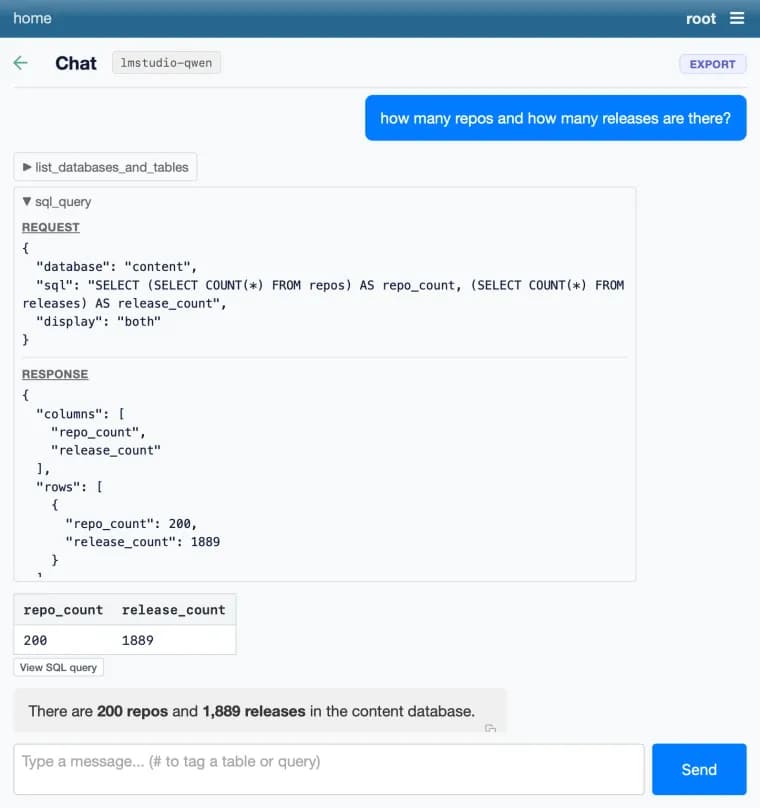
The post shows how this works with a short example. You download a database file from datasette.io (content.db), then launch Datasette through uvx with the datasette-agent plugin added. The command sets the root user and a secret, and sets the datasette-llm plugin's default_model setting to a small JSON object with three fields: a model name of "lmstudio-qwen", a model_name of "qwen/qwen3.8-27b", and an api_base of http://localhost:1234/v1, which points at a local server. Run that, and you get a local server running a Datasette Agent instance powered by your local model.
The post is short and gives no other details about the release.
Key facts
- datasette-llm, the Datasette plugin that configures LLMs for other Datasette plugins, now supports OpenAI-compatible endpoints.
- That lets Datasette use an LLM hosted anywhere that speaks the OpenAI protocol, including local models run with LM Studio, Ollama or llama.cpp.
- The example sets the default_model setting to a Qwen model (qwen/qwen3.8-27b) at the local api_base http://localhost:1234/v1.
- Run through uvx with the datasette-agent plugin, the example gives a local Datasette Agent instance powered by the local model.
- The post is dated 14 November 2026 and mentions that llama.cpp has just reached v1.0.0.
Why it matters
This release lets Datasette's LLM features point at any server that speaks the OpenAI protocol. Because that includes LM Studio, Ollama and llama.cpp, a Datasette Agent can run on a model on your own machine. The post presents the OpenAI protocol as a pseudo-standard, which is why one setting can cover so many back ends.
Who it affects
People who use Datasette and its plugins, and who want to run an LLM locally or on a host of their choice. Anyone already running LM Studio, Ollama or llama.cpp is the audience the post speaks to directly. Plugin authors who rely on datasette-llm for model configuration gain the same option through it.
How to use it
The post gives a working recipe. Download content.db from datasette.io with wget, then run Datasette with uvx, adding the datasette-agent plugin. Pass the root and secret options, and set plugins.datasette-llm.default_model to a JSON object with a model label ("lmstudio-qwen"), the model_name your server exposes ("qwen/qwen3.8-27b") and the api_base of your local server (http://localhost:1234/v1). Swap in your own model name and endpoint URL for other setups.
How solid is it
This is a first-party announcement from the plugin's author, and it includes a concrete command. The post gives no benchmarks or performance figures for local models. It does not say whether the local Qwen model in the example was tested for quality or what hardware it needs.
Risks and caveats
The post is brief. It does not say which other Datasette plugins besides datasette-agent use datasette-llm, and it mentions no breaking changes, changelog or other changes beyond OpenAI-compatible endpoint support. The version string in the headline comes from the item title, not the post body. The llama.cpp v1.0.0 mention is only in passing and is not tied to this release.
“And you'll get a local server running a Datasette Agent instance powered by your local model!”
— Simon Willison, simonwillison.net