KetchUp is a free open-source 3D modeler for woodworking, built in Rust
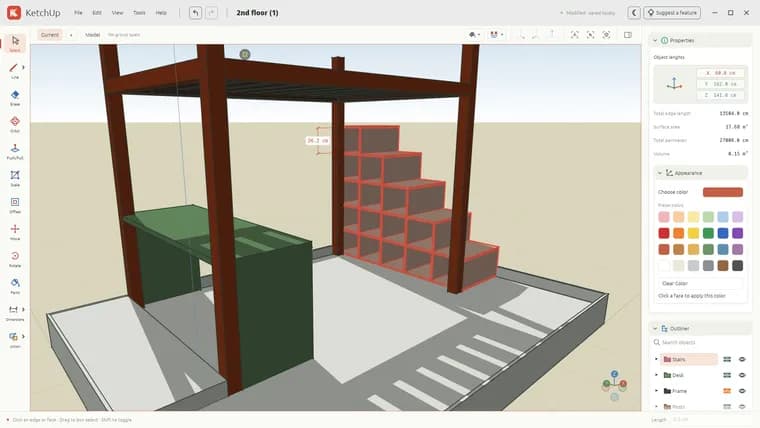
KetchUp is a free, open-source 3D modeling app aimed at woodworking and furniture design. Its project page pitches it as a way to plan a shelf, table, cabinet or workbench with exact measurements before building. It runs on Windows, macOS and Linux as a native app, or directly in a desktop browser. No account is needed, and the page says there is no cloud storage to set up. The code is open source under the MIT license and written in Rust.
The modeling workflow follows the push/pull style of sketch-based 3D tools. You sketch lines, rectangles, circles and freehand outlines, then turn faces into forms with Push/Pull, and move, scale, offset and paint the result. You can snap to geometry and axes, type exact lengths, and add dimensions. Groups, reusable components and tags help organize bigger models. Tape Measure and Dimensions tools let you inspect a design, and Orbit lets you walk around an assembly to check proportions before taking the plan to the workshop.
The page describes a typical woodworking use: draw board outlines with rectangles and lines, use Push/Pull to give them thickness, then move and copy geometry to explore shelves, tables, cabinets and workbenches. It names its audience as woodworkers, furniture makers and DIY builders who want to explore a project in 3D.
Getting started is short. The editor opens on a clean slate. Click one corner and then the opposite corner to create a first face, choose Push/Pull, click the face, move the mouse and click to finish. Orbit is a drag, scroll zooms, and pressing F fits the model to the view.
Saving works locally. The model is autosaved in the browser on that device, and File, then Save, downloads a portable .ketchup project file that can be kept or opened again. The page warns that clearing browser data can remove autosaved work, so projects worth keeping should be downloaded.
For interchange, File, then Import/Export, can import SketchUp (.skp) geometry and export Wavefront OBJ (.obj). Imports run locally. There are limits: SketchUp textures, scenes and some model features are not supported, and OBJ export includes geometry without materials.
The browser version needs a desktop browser with hardware acceleration and WebGPU or WebGL2 support, plus a mouse and keyboard. The page says the app is made for a desktop browser and a mouse. The page also points to a user guide and to the code on GitHub.
Key facts
- Free, open-source (MIT license) 3D modeling app for woodworking and furniture design, written in Rust.
- Runs in a desktop browser or as a native Windows, macOS or Linux app; no account needed.
- Core tools: sketching, Push/Pull, move, scale, offset, paint, exact lengths with snapping, dimensions, groups, components and tags.
- Imports SketchUp (.skp) geometry and exports Wavefront OBJ; textures and scenes are not imported, and OBJ export has no materials.
- Autosaves locally in the browser and saves portable .ketchup files; clearing browser data can remove autosaved work.
Why it matters
Hobbyist and professional 3D design tools often come with accounts, subscriptions or cloud storage. KetchUp is offered as free and open source under the MIT license, needs no account, and keeps files on the user's device. It runs in a desktop browser as well as natively, so trying it takes a page load. It can also import SketchUp (.skp) geometry, which gives people with existing SketchUp models a way in. The page targets one narrow job, planning furniture and woodworking projects with exact measurements, rather than general-purpose 3D work.
Who it affects
The page names woodworkers, furniture makers and DIY builders who want to explore a project in 3D before building. People with existing SketchUp models may also care, since geometry can be imported, though textures, scenes and some model features will not come across. Developers interested in Rust or in contributing can find the code on GitHub, which the page links.
How to use it
Open the browser editor or download the desktop app for Windows, macOS or Linux. In the browser you need a desktop browser with hardware acceleration and WebGPU or WebGL2 support, plus a mouse and keyboard. Click one corner and then the opposite corner to make a first face, then use Push/Pull to give it thickness. Orbit by dragging, zoom by scrolling, and press F to fit the model. Type exact lengths, snap to geometry and axes, and use Tape Measure and Dimensions to check the design. Use File, then Save, to download a .ketchup project, and File, then Import/Export, for SketchUp import or OBJ export. The page also links a user guide.
How solid is it
The account rests on the project's own page, which describes features and limits in plain terms, including what does not work. The text does not name any author, developer or organisation. The page text calls the app BenchUp, while the story title and the .ketchup file extension use the KetchUp spelling. The page text gives no release date, version number, performance figures or user counts, so how mature the app is cannot be judged from it.
Risks and caveats
Autosaved work lives in the browser, and clearing browser data can remove it, so important projects must be downloaded as .ketchup files. There is no cloud storage to fall back on. SketchUp import brings geometry only: textures, scenes and some model features are not supported. OBJ export carries geometry without materials, which limits hand-off to other 3D tools. The app is made for a desktop browser and a mouse; touch or mobile use is not described. The browser version also depends on hardware acceleration and WebGPU or WebGL2 support.
“Plan a shelf, table, cabinet, or workbench with exact measurements before you build.”
— Project page