llm-keys-ui plugin lets Codex Remote agents fetch API keys without pasting
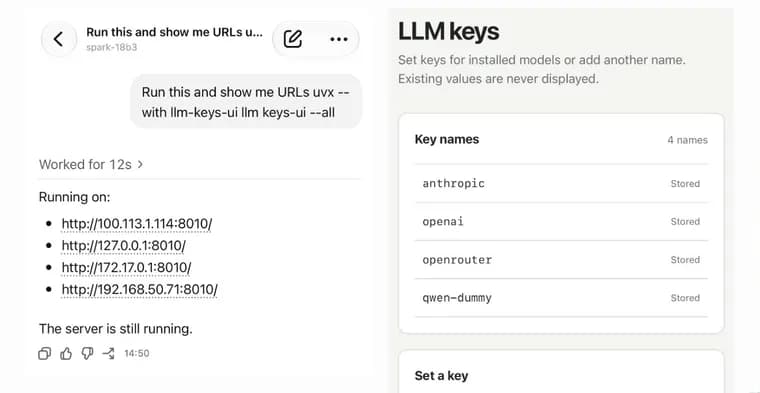
llm-keys-ui is a newly released plugin for the llm command-line tool. It solves a narrow problem: someone using OpenAI's Codex Remote to run coding agents on several machines, controlled from their phone, sometimes needs to configure an API key on one of those machines to work on an LLM project. Pasting the key directly into the agent session, or into the ChatGPT app itself, is something the plugin's author wanted to avoid, so the plugin gives another route. Telling Codex to run the command uvx --with llm-keys-ui llm keys-ui --all starts a small web interface and has Codex report back a URL for it, which can be a local network address or a Tailscale device IP. That interface is used to save additional API keys onto the machine. Once a key is saved, it can be retrieved later with a command such as llm keys get anthropic, used as part of a shell command whenever the agent needs to authenticate to a provider.
Key facts
- llm-keys-ui is a new plugin for the
llmcommand-line tool, built to save API keys onto a remote machine without pasting them into an agent session or the ChatGPT app. - It is meant for use with Codex Remote, which runs coding agents on various machines while they are controlled from a phone.
- Telling Codex to run
uvx --with llm-keys-ui llm keys-ui --allmakes it report back a URL, including local network or Tailscale device IPs, for a web interface to save additional API keys. - A saved key can later be retrieved with a command like
llm keys get anthropic, used as part of a shell command when an agent needs it.
Why it matters
Coding agents that run on remote machines, sometimes started and monitored from a phone, still need API keys to talk to model providers. Typing a key into a chat app or straight into an agent session is exactly the kind of exposure a security-conscious workflow wants to avoid, and this plugin exists to close that specific gap rather than to be a general product launch.
Who it affects
People who use Codex Remote to run coding agents on machines they are not sitting at, and who occasionally need to hand one of those machines an API key, for example to work on an LLM-related project. It is a narrow, practitioner-level tool rather than something aimed at a broad audience.
How to use it
From a Codex Remote session, run uvx --with llm-keys-ui llm keys-ui --all and have Codex report back the URL it starts, which may be a local network address or a Tailscale device IP. Opening that URL gives a web interface for saving additional API keys onto the machine. Afterward, a saved key can be pulled into a shell command with something like llm keys get anthropic.
How solid is it
The only source is the plugin's own announcement post, written in the first person by the person who built and uses it. There is no independent report, no adoption figures, and no detail beyond the mechanism the post describes; the 0.1 in the plugin's name points to an early release.
Risks and caveats
The interface for saving keys is reached over a local network or Tailscale address, so its exposure depends on how trusted that network is; the post does not discuss authentication or access control for the interface itself, and it does not claim to remove the underlying risk of handling API keys, only to change where they get typed in.
“I don't like pasting API keys into agent sessions, so I wanted a way to get those keys onto a machine without pasting them into the ChatGPT app directly.”
— the plugin's author, in the post announcing it