web-edit 0.1a0: a Python web UI for editing files, built with Codex
On 12 October 2026 the author of a personal blog described a small tool called web-edit (version 0.1a0 in the post title). It is a Python web app that provides a web UI for viewing and editing files in a folder.
The motivation was practical. The author was working on a project from a phone using Codex Remote and wanted to edit a credentials file without round-tripping those credentials through the LLM itself. So the author had Codex and GPT-6 Astra Extra High build the app.
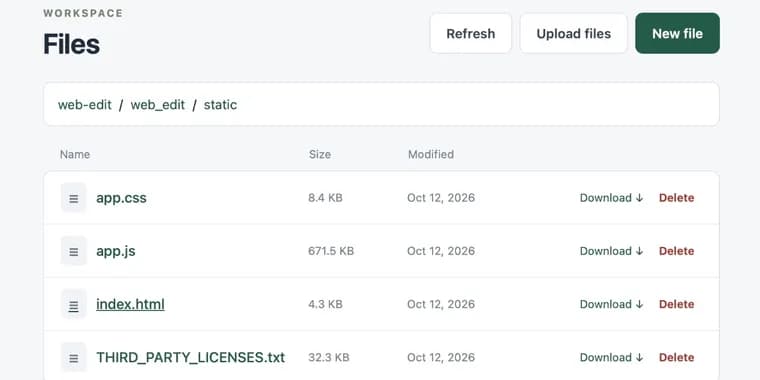
The app is intended to be run over Tailscale. An agent can start it running, and the author can then edit files through their Tailscale network directly from the phone. The post shows a screenshot of the interface for browsing the files in a folder.
For editing, the app uses CodeMirror 6. The author had planned to use Monaco, but says it still does not have a great mobile experience yet.
Key facts
- web-edit is a Python web app with a web UI for viewing and editing files in a folder, published in a post dated 12 October 2026.
- It was built by Codex together with GPT-6 Astra Extra High.
- The trigger: the author wanted to edit a credentials file from a phone, while using Codex Remote, without passing the credentials through the LLM.
- It is meant to be run over Tailscale, started by an agent, with files edited from the phone via the author's Tailscale network.
- Editing uses CodeMirror 6; Monaco was the first choice but still lacks a great mobile experience.
Why it matters
The post shows a small, concrete answer to a real friction in agent-driven work: some files, such as credentials, should be edited by hand rather than pushed through the model. Instead of pasting secrets into a chat, the author had an agent build a tool that lets a person edit the file directly, without the credentials passing through the LLM.
Who it affects
Mainly people who run coding agents such as Codex, especially remotely from a phone, and who want a way to change sensitive files without the LLM seeing them. It is also relevant to anyone already using Tailscale to reach their own machines.
How to use it
The author describes the intended setup: run the app over Tailscale, have an agent start it in the folder in question, then open it from a phone through the Tailscale network to browse and edit files. No repository link, license, install instructions or release details for web-edit are given in the post.
How solid is it
This is a first-person description from the tool's builder, with one screenshot of the file-browsing interface and no benchmarks or tests. The version label 0.1a0 in the title points to an early release. The specifics stated in the post are the tool's purpose, the Tailscale deployment idea, and the choice of CodeMirror 6.
Risks and caveats
The post does not say whether the app has any authentication or security measures beyond running over Tailscale. No details are given on which Python version or dependencies it needs, how long the build took, or what it cost. Treat it as a personal early-stage tool rather than a packaged product.
“I was going to use Monaco but that still doesn't have a great mobile experience yet.”
— Post author, 12 October 2026