A developer turns his CMF Phone 1 into a production server
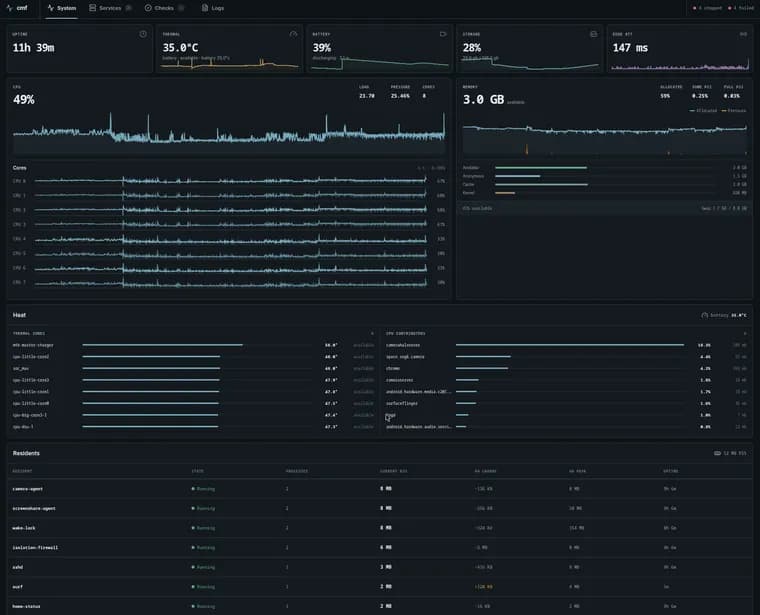
The author, who blogs under the handle seg6, used to run personal infrastructure on a small Hetzner VPS: a few web apps, a remote browser called Surf with its own managed Chrome instance, the Caddy web server, and other supporting services. The setup worked, but Surf's Chrome workload needed real CPU, and the cheap shared VPS choked once it had to do actual work; dedicated CPU machines cost too much for a personal browser. Buying a new machine looked unappealing too, since DRAM prices had spiked. Instead the author reached for a CMF Phone 1 already sitting in a drawer: eight ARM cores, 8 GB of RAM, 128 GB of flash, Wi-Fi 6, a 5G modem, and built-in battery backup. Today that phone runs Surf and its Chrome instance, a personal finance tracker, a screen sharing service, and several smaller web apps, surviving reboots and network changes.
The first approach was to flash a normal Linux distribution (postmarketOS has a device port for the CMF Phone 1). It booted, but Wi-Fi, Bluetooth, hardware acceleration and most of what makes the phone useful as a server were broken; the attempt ended at a black screen, and the author briefly thought the phone was bricked. Recovering stock Nothing OS started with a QEMU Windows VM that hung on USB passthrough and MediaTek drivers, so the author moved to an actual Windows installation to run the official flashing tool and restore the factory images. The lesson: Android already has working drivers for every piece of this hardware, so the author dropped the idea of replacing Android and instead kept stock Android as the hardware layer, running Linux applications on top of it.
The second approach used Termux as the host environment. Termux supplies OpenSSH, the runit process supervisor, Caddy, Cloudflared and normal Unix tooling, with Termux:Boot starting the supervisor and SSH after every reboot; Tailscale gives the phone a stable private address. Because Android's battery management actively fights a device trying to act as a server, an Ansible-applied Android host profile installs a persistent wake lock, disables light and deep idle, exempts Termux, Termux:Boot and Tailscale from background restrictions, disables the child-process limiter, prevents Wi-Fi suspension, and sets Tailscale as the always-on VPN. The boot chain runs Android, then the always-on VPN, then Termux:Boot, then runit, then the resident services, then local and public health checks.
Most applications ship as Linux ARM64 OCI images, and proot-distro/PRoot let those run under a Debian filesystem inside Termux without root or a special kernel, since PRoot intercepts filesystem and process calls in userspace. That was fine for ordinary web services, but Surf's Chrome workload crossed PRoot's translation layer for every process start, library load and file read, and could not use the phone's CPU efficiently. The author rooted the phone, not to replace Android but to mount the same Debian filesystem with a real chroot instead of PRoot. Runit still owned the service lifecycle; only the syscall path changed, from PRoot to native. The performance gain from that switch was, in the author's words, "not subtle." The smaller services were then moved to the same rooted chroot approach, since PRoot no longer offered any advantage. A root helper creates a private mount namespace, binds the required paths, chroots in, drops privileges, and starts the image's entrypoint; the residents still share Android's kernel and network stack, so this remains a compatibility layer rather than a security boundary. A parallel attempt to bridge Debian's graphics stack to the phone's Mali GPU through VirGL and Android Vulkan produced corrupted output and worse performance than plain software rendering, so software rendering stayed.
The whole host is managed as Ansible-declared state: versions, service definitions, routes, power settings, secrets and health checks live in one private repository. Releases are pinned by checksum or digest in Git, deployed by Ansible over SSH into versioned directories behind an atomic "current" symlink, and gated by a health check; a failed checksum or health check stops the deployment, and rollback means reverting the pin and reapplying. After a one-time manual bootstrap (install three Android apps, root the phone, grant Termux superuser access, authorize SSH), the rest of the host state is reached by running make phone from the author's workstation. Secrets are not stored on the phone at all; Ansible Vault values live encrypted in the infrastructure repository, and the vault password is derived by having a 1Password SSH agent sign a fixed challenge, so the private key never leaves 1Password.
For ingress, HTTP applications go through a Cloudflare Tunnel: Cloudflared makes one outbound connection from the phone, and Caddy routes each hostname to a loopback service, with no inbound router rule needed, so the setup survives the phone changing networks. Surf's remote browser backend needed a different path, since its connection is latency sensitive, terminates its own TLS, and is pinned by an old iPad client. At home, a Cloudflare DDNS record tracks the current public address and the router forwards one port directly to Surf; on the LAN, the iPad connects to the phone directly. Away from home, a normal Cloudflare Tunnel would terminate TLS at Cloudflare, breaking the iPad's pinned connection, so the author wraps the full Surf TLS stream inside an ordinary WebSocket that Cloudflare simply forwards, keeping the authenticated Surf connection encrypted end to end inside it. This adds roughly one extra network round trip from outside the home network; the iPad's connection over that WebSocket tunnel measured around 60 ms when first tested. The author describes going to the office, SSHing through Tailscale into the workstation and the phone, and using the same iPad through the phone-hosted Surf instance as the moment the project stopped feeling like a shortcut and started feeling like it had actually replaced the VPS.
Key facts
- The author replaced a Hetzner VPS running Surf (a remote browser), Caddy and other apps with a CMF Phone 1: eight ARM cores, 8 GB RAM, 128 GB flash, Wi-Fi 6, a 5G modem and built-in battery backup.
- A first attempt to flash postmarketOS onto the phone left Wi-Fi, Bluetooth and hardware acceleration broken and briefly bricked the device to a black screen; recovering stock Android needed a QEMU Windows VM that hung on USB passthrough and MediaTek drivers before an actual Windows installation restored the factory images.
- The final setup keeps stock Android as the hardware layer and uses Termux (OpenSSH, runit, Caddy, Cloudflared, Tailscale) as the host, with an Ansible-applied Android profile disabling idle states and battery restrictions to keep services alive.
- Moving the latency-sensitive Surf/Chrome workload from PRoot emulation to a real rooted chroot produced what the author calls a 'not subtle' performance improvement; smaller services were later moved the same way.
- The whole host is Ansible-managed: OCI images pinned by digest, deployed into versioned directories behind an atomic symlink with health checks and rollback, secrets in Ansible Vault unlocked via a 1Password SSH agent challenge, and ingress via Cloudflare Tunnel plus Tailscale with no open router ports; the iPad-to-Surf connection measured about 60 ms.
Why it matters
It is a working demonstration that a stock, unmodified smartphone can replace a cloud VPS for real personal workloads, not just toy ones, without wiping Android or exposing router ports. The author's trigger was concrete: a browser-automation workload (Surf plus its managed Chrome instance) that made cheap shared VPS CPU feel starved, dedicated CPU pricing that felt disproportionate for a personal project, and DRAM prices that made buying new hardware unappealing. The response was not a compromise on capability; the phone now runs the finance tracker, screen sharing and web apps it replaced, and survives reboots and network changes, which is the bar a self-hosted service needs to clear to be trusted.
Who it affects
Self-hosters and home-lab tinkerers who already own idle phones with decent specs, and developers weighing a dedicated CPU VPS against hardware they already paid for once. It also speaks to anyone running latency-sensitive workloads (like a remote browser) who assumed a phone's application sandboxing would be too slow for that class of task.
How to use it
The recipe as described: keep the phone on stock Android rather than flashing a Linux distribution, since Android's own drivers for Wi-Fi, the GPU, the modem and power management already work. Use Termux plus Termux:Boot as the host control plane (OpenSSH, runit, Caddy, Cloudflared, Tailscale), and apply an Android host profile through Ansible to install a persistent wake lock, disable idle states and background restrictions, and set Tailscale as the always-on VPN. Run most application images through proot-distro/PRoot, but root the phone and use a real chroot for any workload that is CPU- or latency-sensitive, since PRoot's userspace translation layer showed a measurable cost there. Manage the entire host as Ansible state (digest-pinned images, versioned directories, an atomic 'current' symlink, health checks and rollback) rather than as manually run commands, and route inbound traffic through a Cloudflare Tunnel and Tailscale so no router ports need to be opened; a WebSocket-wrapped raw TLS stream is one way to preserve a pinned-certificate connection through a tunnel that would otherwise terminate TLS itself.
How solid is it
This is a single, detailed first-person case study from the person who built and now runs the setup, not an independently verified benchmark. The specific numbers given are limited: the phone's hardware specs (eight ARM cores, 8 GB RAM, 128 GB flash) and one latency figure, about 60 ms for the iPad's connection over the WebSocket-wrapped tunnel to the phone-hosted Surf backend when first tested. The PRoot-to-chroot performance gain is described only qualitatively, as 'not subtle', with no measured figure. The account is otherwise consistent and detailed about the failure modes it hit along the way, including the postmarketOS attempt that left the phone briefly unusable, which reads as a credible warning rather than a glossed-over footnote.
Risks and caveats
The author is explicit that PRoot and chroot here are compatibility layers, not security boundaries: every application resident still shares Android's kernel and network stack, so isolation between services is weaker than on a conventional VM or container host. The setup also depends on deep, somewhat fragile customization of Android's power management (persistent wake lock, disabled idle states, an exempted background-restriction list) to keep a phone behaving like an always-on server, and the postmarketOS attempt shows how close that kind of low-level tinkering can come to bricking the device. No cost figures, either for the old VPS or the new setup, and no total time spent on the project are given, so the piece cannot be used to judge the actual savings or effort involved.
“I had neither a server nor a phone.”
— seg6, describing the moment the postmarketOS flash left the device stuck on a black screen