Adobe Lightroom mobile adds one-tap Open Eyes fix for closed eyes
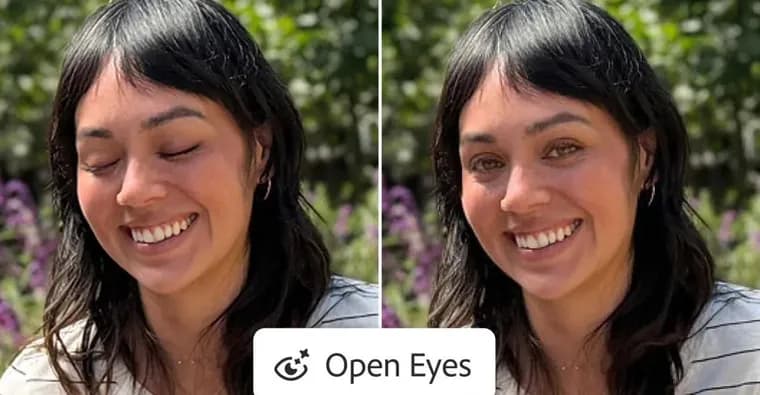
Adobe announced that the mobile version of Lightroom, available for iOS, iPadOS and Android, can now open closed eyes in photos using generative AI with a single tap. The Verge reported the news a day after the announcement.
When the app detects that a person, or a group of people, has their eyes closed in a photo, it automatically presents a new Open Eyes Quick Action. The action appears as an icon over the image and gives easy access to the feature.
The idea of rescuing an otherwise good photo by opening a subject's eyes is not new at Adobe. Photoshop Elements has offered it for nearly a decade. But as DPReview points out, Elements sources the replacement eyes from another photo of the subject, and the results are mixed depending on how much the two images differ. Open Eyes in Lightroom mobile relies on generative AI instead, so the replacement eyes match the lighting and pose. The app also uses other images of the same person in the user's Lightroom library as reference, so the open eyes match the color, size and shape of the person's own.
A similar fix is possible in other Adobe apps such as Photoshop, using its generative AI tools. It is not a one-tap job there, and it is not free. In the free version of Lightroom mobile, users can try Open Eyes twice before they are prompted to subscribe to an Adobe Creative Cloud plan that includes more credits for its AI-powered tools, according to DPReview.
Key facts
- Lightroom mobile on iOS, iPadOS and Android can now open closed eyes in photos using generative AI with one tap.
- The app detects closed eyes in a person or group and shows a new Open Eyes Quick Action as an icon over the image.
- Other photos of the same person in the user's Lightroom library serve as reference, so the eyes match their color, size and shape.
- Photoshop Elements has had a similar fix for nearly a decade, but it takes replacement eyes from another photo, with mixed results.
- Free-version users can try Open Eyes twice before being prompted to subscribe to an Adobe Creative Cloud plan, according to DPReview.
Why it matters
Adobe now offers a fix for a blink in an otherwise good shot as a single tap in a phone app. A similar fix in Photoshop is not a one-tap job, and it is not free. The change is in method as well: Photoshop Elements has offered the fix for nearly a decade by borrowing eyes from another photo, with mixed results. Lightroom mobile generates the eyes instead, aiming to match lighting and pose.
Who it affects
Anyone who edits photos in Lightroom on iOS, iPadOS or Android, especially people who shoot group portraits, where one closed pair of eyes can spoil a frame. Free-version users are affected too, since they get a limited number of tries.
How to use it
Open a photo in Lightroom mobile. If the app detects closed eyes, an Open Eyes Quick Action appears as an icon over the image; tap it. Free users can run the feature twice before being prompted to subscribe to an Adobe Creative Cloud plan, which includes more credits for Adobe's AI-powered tools, according to DPReview. The result is better when the library holds other images of the same person, since the app uses them as reference.
How solid is it
This is a short report by The Verge on Adobe's announcement. The free-version limit and the comparison with Photoshop Elements are attributed to DPReview. The source reports no testing of how well Open Eyes works, and gives no quotes from Adobe.
Risks and caveats
The two-try limit for free users is secondhand, from DPReview. The source does not give plan pricing or say how many credits paid plans include. It does not say whether the feature is available in Lightroom desktop, and it does not describe the underlying AI model. Results on real photos are untested in the source.