Claude Opus 5.5 turns three photos into a pixel art kākāpō party for a keynote
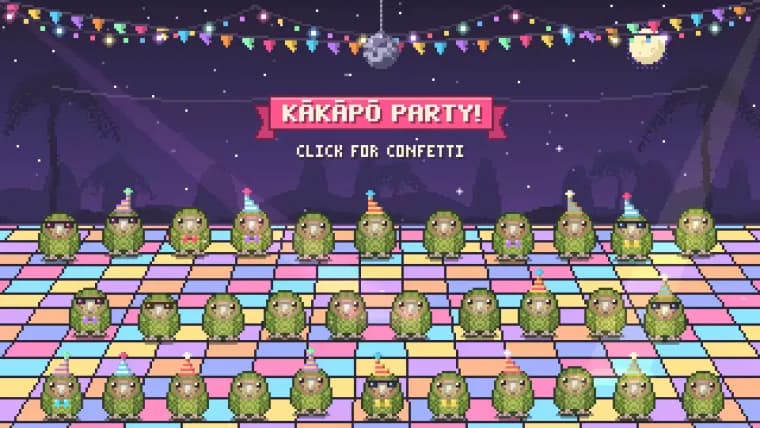
The author gave a closing keynote at the WeAreDevelopers World Congress North America and wanted to mark what he called the record breaking kākāpō breeding season of 2026. Having heard buzz about how good Claude Opus 5.5 was at pixel art animation, he gathered three kakapo photos from Google Image Search and fed them to Claude along with a prompt asking for the photos to be used only as a reference: 'I need you to make an animation in animated pixel art on HTML 5 canvas of obviously pixel art kakapo jumping up and down having a party with confetti and suchlike, there should be at least 20 of them.' Claude produced an HTML5 canvas page matching the brief, which the author called 'pretty great.'
To embed the result in his Keynote presentation, he downloaded the generated HTML file and asked a local Claude Code session to turn it into a video: 'Make me a video of file:///Users/simon/Downloads/kakapo-party.html, you need to load it in a browser and click on it a few times to get the confetti effect, the video should be 15s long,' adding that clicking should not start until 3 seconds in and that clicks should be spread around the clickable area. Claude Code wrote a short Python script using Playwright that launched a Chromium browser at a 1280 by 720 resolution, loaded the local HTML file, and fired a sequence of ten timed mouse clicks across the centre, corners and edges of the canvas between 3 and 13.2 seconds into the recording to trigger the confetti effect repeatedly, before closing the browser and saving the recorded video. The resulting video was exactly what the author needed and went on his closing slide. He published the prompt, the Claude transcript, the resulting page, the video and the full Playwright script in his post.
Key facts
- The author gave a closing keynote at WeAreDevelopers World Congress North America and wanted a closing-slide tribute to the record breaking kākāpō breeding season of 2026.
- He fed Claude Opus 5.5 three kakapo photos from Google Image Search with a prompt asking for a pixel art HTML5 canvas animation of at least 20 kakapo jumping and partying with confetti.
- He then used a local Claude Code session to write a Playwright script that loaded the resulting HTML page in a browser and recorded a 15 second video at 1280x720 resolution.
- The Playwright script waited 3 seconds before firing a sequence of ten timed mouse clicks spread across the canvas to repeatedly trigger the confetti effect for the recording.
- The finished video was used on the closing slide of the keynote, and the author published the prompt, transcripts, the HTML page, the video and the full Playwright script.
Why it matters
It is a compact, first-hand illustration of a two-step generative workflow: a chat model (Claude Opus 5.5) turning reference photos and a plain-language brief into a working animated web page, and a coding agent (Claude Code) turning that page into a finished video file by writing and running its own browser-automation script. Neither step required the author to write animation or Playwright code by hand.
Who it affects
Conference speakers and presenters looking for quick, custom visual assets, and developers curious about using coding agents to script browser automation tasks like screen recording, rather than writing that tooling themselves.
How to use it
Give a model like Claude Opus 5.5 a few reference photos plus a descriptive prompt specifying the style, a minimum count of elements and the effects wanted (here, pixel art kakapo, at least 20 of them, jumping with confetti), then hand the resulting HTML file to a coding agent such as Claude Code with instructions for the video length, when clicks should start, and that clicks should be spread across the clickable area; the agent can write and run a Playwright script that loads the page, times its clicks, and records the session as a video.
How solid is it
This is a first-hand account by the person who ran the workflow, with the actual prompts, the Claude transcript, the resulting HTML page, the video, and the full Playwright script all published alongside the post, so the account is well documented, though it remains a single personal demonstration rather than a broader technical evaluation.
Risks and caveats
This is one specific, favourable example from the person who built it, not a benchmark of animation quality or reliability across different subjects or prompts; the post does not say which underlying model powered the local Claude Code session that generated the Playwright script.
“I need you to make an animation in animated pixel art on HTML 5 canvas of obviously pixel art kakapo jumping up and down having a party with confetti and suchlike, there should be at least 20 of them”
— the author, in his prompt to Claude Opus 5.5