Microsoft's Flint-interactive lets AI agents build interactive charts
Microsoft Research has published a blog post introducing Flint-interactive, a language for creating interactive data visualizations on top of Flint. The pitch: AI agents already make it easy to analyze data and produce reports with charts, but readers who want to explore also want to zoom in on details, compare data across charts, or highlight related text in a document from a chart selection, and the other way round. The post says that calls for agents that can produce interactive visualizations, ideally with the quality of interactive stories in sophisticated data journalism.
The authors say this is possible today but there is a practical gap, even with capable frontier models. They name two problems. First, generation cost: agents rarely produce a fully satisfactory interactive visualization in one turn, and repeated rounds of reasoning, coding and debugging consume tokens and time. Second, reliability: expressive interactive charts easily end up with poor layouts or broken interactions, and fixing them risks introducing new problems. Meanwhile, the built-in interactions in some visualization libraries are not expressive enough on their own for bespoke interactive charts. The post traces all of this to the lack of an expressive yet high-level language for specifying visual interactions.
Flint-interactive is that language. Its power comes from Flint's compiler, which translates user interactions into semantic events that capture the meaning of what users select, then uses high-level operators to update visualizations in response. That moves the burden of resolving complex dependencies between interaction logic and visual logic to the compiler, so a user or an agent can describe interactions with high-level specifications. The post says this helps avoid many of the layout, rendering and debugging challenges common in custom interactive visualizations. Supported interactions include clicking, filtering, zooming, highlighting and cross-chart interactions.
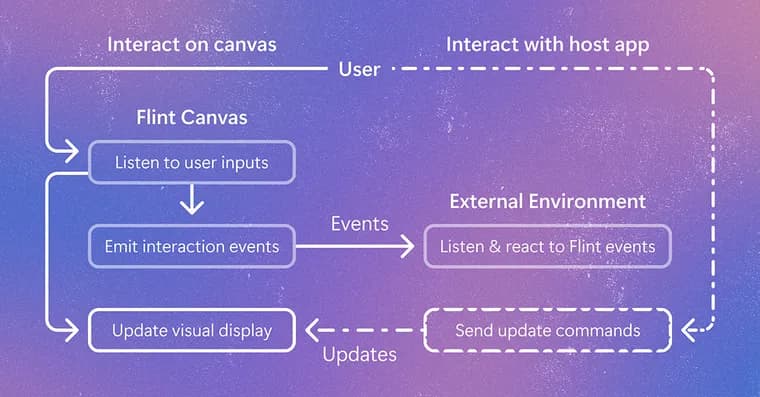
How it works: Flint Canvas is a state machine that tracks user interactions on the canvas and manages visual rendering state. Visual logic stays with the compiler, which resolves raw triggers such as clicks, drags and key presses into semantic events that identify chart elements and data, translates update operators into rendered canvas changes, and handles hit testing and low-level visual updates. Interaction logic is written by the user, who maps semantic events to chart update operators such as set style (to highlight data), set annotation (to label a point) or set viewport (to pan or zoom). The same semantic events can also update external tables, widgets or application state. Because event generation and visual updates are compositional, the same model connects Flint with tables, text, other charts and widgets, so actions in one view can update charts, documents or application state in another, for interactive stories and dashboards.
The post gives three ways to use it. In chat or canvas environments, Flint-interactive works through Flint-MCP and MCP Apps, following the MCP setup guide; with the latest release, you tell the agent what to chart and which interactions you want, and it can generate an interaction_spec alongside the Flint chart spec and render the interactive chart in the conversation. To build an app, you use Flint Interactive Canvas: the app can use event handlers to process semantic events from Flint Canvas, for example to filter a table, update another chart or change application state, and can send update operators to Flint Canvas so its own widgets control how the chart updates. For bespoke interactions beyond Flint's presets, you define a trigger and a custom handle function in the programming API that maps semantic events to custom chart update sequences. One example: a handler that highlights a clicked country and labels it by name, combining set-style and set-annotation without touching renderer-specific marks.
The closing call to action is split by audience. Chart users can set up Flint in their chat and ask an agent for an interactive chart, with an interaction gallery for inspiration. App builders can use the programming API and share the interaction-author skill with their coding agent to add presets to an app. Interaction designers can explore the bespoke examples, design a new interaction, turn it into a reusable preset, and propose it on GitHub to expand Flint's interaction vocabulary.
Key facts
- Flint-interactive is a language for creating interactive data visualizations on top of Flint, aimed at both users and AI agents.
- Flint's compiler turns raw triggers (clicks, drags, key presses) into semantic events, and high-level update operators (set style, set annotation, set viewport) change the chart in response.
- The post names two problems it targets: high generation cost (repeated reasoning, coding and debugging rounds) and unreliable layouts or broken interactions in agent-made interactive charts.
- It works in chat or canvas environments through Flint-MCP and MCP Apps, where an agent can generate an interaction_spec alongside the Flint chart spec.
- The same event model links charts with tables, text, widgets and application state, and designers can propose new interaction presets on GitHub.
Why it matters
Agents can already turn data into charts, but exploration needs interaction: zooming, filtering, highlighting, and linking a chart selection to a table or to text in a document. The post says producing that with agents is costly and fragile today, because each attempt takes several rounds of reasoning, coding and debugging, and expressive charts easily break. Flint-interactive tries to remove the problem at the language level: the agent states what should happen at a semantic level, and the compiler deals with rendering details such as hit testing and low-level visual updates.
Who it affects
The post addresses three groups. Chart users can ask an agent in chat for an interactive chart and explore it directly. App builders can wire charts into dashboards, data stories and other applications, including agents they build for their own customers. Interaction designers can contribute reusable presets that widen Flint's interaction vocabulary.
How to use it
In chat or canvas environments, set up Flint through Flint-MCP and MCP Apps using the MCP setup guide, then tell the agent what to chart and which interactions you want. In an app, use Flint Interactive Canvas, handle the semantic events it emits (for example to filter a table or update another chart) and send update operators back to it. For custom behavior, define a trigger and a custom handle function in the programming API. The post also points to an interaction gallery, bespoke examples, and an interaction-author skill that can be shared with a coding agent to add presets to an app.
How solid is it
This is a first-party Microsoft Research blog post describing its own work. It reports no benchmarks, measurements, user studies or numeric results on cost, reliability or token savings, so the claims of easier building and better reliability are stated, not demonstrated in the post. It does not say which models or agents were tested.
Risks and caveats
The post says the system helps avoid many of the layout, rendering and debugging challenges, not all of them. No release date, version number, licensing or pricing terms are given, and the post does not explain what Flint itself is beyond calling Flint-interactive a language on top of it. Anyone adopting it has to rely on the project's own examples and documentation to judge how far the preset and programming API cover their needs.
“This shifts the heavy burden of resolving complex dependencies between interaction and visual logic to the compiler, so the user (or the agent) can easily describe expressive interactions with high-level specifications.”
— Microsoft Research blog post on Flint-interactive