Nvidia RTX Spark laptops tested: Windows on Arm works, gaming and battery are mixed
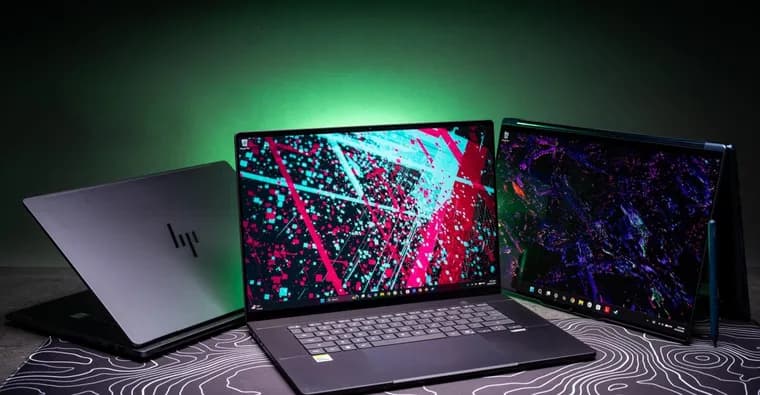
The Verge's Antonio Di Benedetto, Sean Hollister and Tom Warren spent a week with laptops built on Nvidia's RTX Spark N1X processor and published joint impressions. It is explicitly not a scored review of any one machine: it is the thoughts of three writers using five laptops. The subtitle sums up the verdict so far: an exciting new challenger, but exclusively for the high end.
RTX Spark is designed as a high-performing Arm-based SoC for laptops and small desktops, rivaling the best from Apple, Intel, AMD and Qualcomm. It combines many cores, Nvidia RTX Blackwell graphics, and enough power and unified memory to run sizable local AI models. The test fleet: Microsoft's Surface Laptop Ultra with 128GB of unified memory (fully reviewed by Warren), a 64GB Asus ProArt P16 (Hollister), the same P16 in a top-spec 128GB configuration (Di Benedetto), plus a 64GB Lenovo Yoga 9n 2-in-1 and a 32GB HP OmniBook Ultra. All use the same N1X with 20 CPU cores and 6,144 GPU CUDA cores. Prices range from $3,199.99 for the HP OmniBook to $6,999.99 for the Asus ProArt. A cut-down 18-core, 5,120 CUDA version exists in cheaper configurations, but it only gets as low as $2,599.99, for a Surface Laptop Ultra or a smaller Asus ProArt P14 with 24GB of RAM. The laptops are meant for developers, coders and content creators who may also want local AI and gaming with Nvidia tech such as DLSS 5.
Compatibility. Di Benedetto says Windows on Arm is no longer a wholly subpar experience, thanks largely to the push around Qualcomm's Snapdragon X chips: Adobe has had native Arm versions of Photoshop and Premiere for some time, and many x86 apps run fine through Microsoft's Prism emulation. Lightroom Classic is still x86 but shows no issues. Only specialized x86-only software, or wanting every game to work, makes it a non-starter. Hollister used an RTX Spark as a daily driver with Signal, Discord, Audacity, CapCut, Evernote, Irfanview, Slack, ScreenToGif and more, and nothing failed. Quirks: apps sometimes load slowly or need a second try, Evernote notes vanished a few times one day after alt-tabbing (a force refresh fixed it), and apps ignore the system dark-mode preference. Warren, who has used a Qualcomm Windows on Arm laptop daily for two years, can no longer tell native apps from emulated ones and expects Nvidia's entry to improve things for creative apps and gaming.
Gaming. Warren finds that medium settings at 1440p with DLSS performance mode give a stable 60fps in most games, with variation by title. On the 15-inch display he averaged 70fps in Black Myth: Wukong at native 3270 x 2180 (medium, DLSS performance), 66fps in Cyberpunk 2077 with the same settings, and 57fps in Forza Horizon 6. He says it is not as good as a dedicated gaming laptop, but roughly MacBook Pro level and good enough for gaming on the go. Hollister says the GPU is strong but the CPU can hold games back. He got smooth 60fps in Returnal (1440p, high), Expedition 33 (DLSS performance upscaled 1200p, high), Jedi Survivor (DLSS performance upscaled 1200p, medium) and Shadow of the Tomb Raider (native 1800p, highest). Helldivers 2 could not guarantee 60fps in the hardest missions even at DLSS-upscaled 1080p, and Star Wars Zero Company stayed capped at roughly 37fps to 39fps in battle whatever the settings or resolution. The 2003 game Max Payne 2 dipped to 50fps and UFO 50 had a few hitches. In VR, a Titanfall 2 mod worked but lost stability after a few minutes; the driver for Valve's Steam Frame wireless adapter would not install and Steam's streaming audio did not work, so he is unsure the platform suits VR yet. Gaming also maxes out the fans and runs far louder and hotter than a good desktop or handheld.
Di Benedetto, wanting a MacBook Pro-like laptop with full PC gaming ability, was underwhelmed on night one: on the 128GB Asus ProArt P16 he had to drop the 4K display to 2560 x 1600 and the Big Walk preset from Highest or Very high to High to hold about 60fps. He calls the chip no graphical magician and says cheaper desktops and even laptops with discrete Nvidia graphics can easily beat an N1X. Nvidia claims the graphics are like an RTX 5070 Laptop GPU in an SoC; in his testing they landed between that and an RTX 5060 Laptop GPU. For gamers first, he says, money goes much further with traditional Nvidia graphics cards.
Battery. Hollister's Asus ProArt P16 has a 99.9 watt-hour pack, yet the laptops will not win awards for longevity. Writing in a web browser, his best run was 5 hours 40 minutes at 50 percent brightness, including an hour-long video call. The next day, with two hours of CapCut editing, he got about 5 hours, and a third drain also took 5 hours. Web work draws 13-17 watts on default settings, light video work 20-30 watts, a brief CapCut export up to 50 watts, and Indiana Jones and the Great Circle pushed it to 120 watts; the battery could not sustain that, and at 30 percent charge performance dropped sharply to 60 watts. Charging from a 140W USB-C PD source took 20 minutes to reach 50 percent, 35 minutes to 70 percent and 1 hour 15 minutes to 95 percent. Di Benedetto, who has mostly benchmarked while plugged in, says battery life seems solid anecdotally but a full eight-hour day is unlikely unless you are efficient, and a local AI model means not making it to lunch. He plans usual rundown tests later.
Local AI. Warren's answer to whether it seems useful is: not yet. It feels like a beta aimed at developers, from AI-agent installs flashing command prompts and Visual Studio to fans blasting on basic queries. He struggled to find compelling use cases; many tasks run faster and quieter on a free cloud model, and the real power is leaving an agent running at full throttle overnight to build something. Local processing avoids sharing emails and files with a cloud service, but he regularly closes OpenClaw or Hermes rather than leave them running all day, especially with local file permissions. He is not convinced by the Microsoft and Nvidia vision of agents automating the PC, since he likes editing, writing and gaming himself. Hollister's local-AI section begins right at the end of the text available here.
Key facts
- Three Verge writers tested five RTX Spark N1X laptops for a week (Surface Laptop Ultra, Asus ProArt P16 in 64GB and 128GB configs, Lenovo Yoga 9n, HP OmniBook Ultra); it is impressions, not a scored review.
- Prices run from $3,199.99 (HP OmniBook) to $6,999.99 (Asus ProArt); cheaper 18-core / 5,120 CUDA configs start at $2,599.99.
- Windows on Arm compatibility is largely solved for daily work, but gaming is uneven: Tom Warren averaged 70fps in Black Myth: Wukong and 66fps in Cyberpunk 2077, while Star Wars Zero Company stayed at 37fps to 39fps in battle.
- Antonio Di Benedetto places the graphics between an RTX 5060 and an RTX 5070 Laptop GPU, and says cheaper machines with discrete Nvidia GPUs can easily beat it.
- On the Asus ProArt P16's 99.9 watt-hour battery, Sean Hollister's best web-work run was 5 hours 40 minutes; Warren calls local AI a beta aimed at developers for now.
Why it matters
RTX Spark is Nvidia's bid to put a high-end Arm chip with RTX Blackwell graphics and large unified memory into Windows laptops, rivaling Apple, Intel, AMD and Qualcomm. The testers credit the earlier Qualcomm Snapdragon X push for the improved Windows on Arm software, and expect Nvidia's entry to help creative apps and gaming further. The early verdict is that it is a credible challenger, but exclusively for the high end.
Who it affects
The laptops are aimed at developers, coders and content creators who might also want local AI and some gaming. Gamers whose first priority is graphics get less for their money than from traditional discrete Nvidia graphics cards, according to Di Benedetto. Buyers who depend on specialized x86-only software are the main group for whom Windows on Arm remains a problem. Anyone shopping around the premium laptop market, where the tested machines cost $3,199.99 to $6,999.99, is the practical audience.
How to use it
For gaming, Warren suggests medium settings, 1440p and DLSS performance for a stable 60fps in most games, lowering resolution or settings in some titles and leaning on DLSS and frame generation. Expect loud fans and heat under load. For battery, plan on roughly 5 to 5.5 hours of real work on the Asus ProArt P16 per Hollister, and charge with a 140W USB-C PD source, which took that laptop to 50 percent in 20 minutes. Prices: the 20-core N1X configurations tested run $3,199.99 (HP OmniBook) to $6,999.99 (Asus ProArt); the 18-core versions start at $2,599.99 for a Surface Laptop Ultra or a smaller Asus ProArt P14 with 24GB of RAM. For local AI, Warren suggests the value is in leaving an agent running overnight, not in quick tasks.
How solid is it
This is first-hand testing by three named Verge writers over one week, and the article says plainly that it is not an exhaustive scored review of any one laptop. Game frame rates are specific per-title averages or caps, but they come from different people on different configurations. Battery figures are anecdotal real-world runs on the Asus ProArt P16, and standardised rundown tests have not been done yet. No CPU or synthetic benchmark scores and no direct benchmark comparison with Apple, Intel, AMD or Qualcomm chips appear in the text covered here. The retelling covers the article up to the start of Hollister's local-AI section.
Risks and caveats
Gaming results are uneven: CPU-bound games such as Helldivers 2 and Star Wars Zero Company fall short of 60fps, older and low-powered games can have quirks, and VR support is uncertain after Hollister's driver and audio problems. Heavy loads cut battery life sharply (120 watts drain while gaming, and a performance drop to 60 watts at 30 percent charge), and a full eight-hour work day is unlikely. Local AI feels like an unfinished developer beta, with fans blasting even on basic queries, and Warren avoids leaving local agents running with file access. Cost is a barrier: even the cheapest configuration is $2,599.99.
“Windows on Arm is no longer a wholly subpar experience like it was a few years ago.”
— Antonio Di Benedetto, The Verge