Safari 27.3 beta adds Adaptive Dark Mode to darken light websites
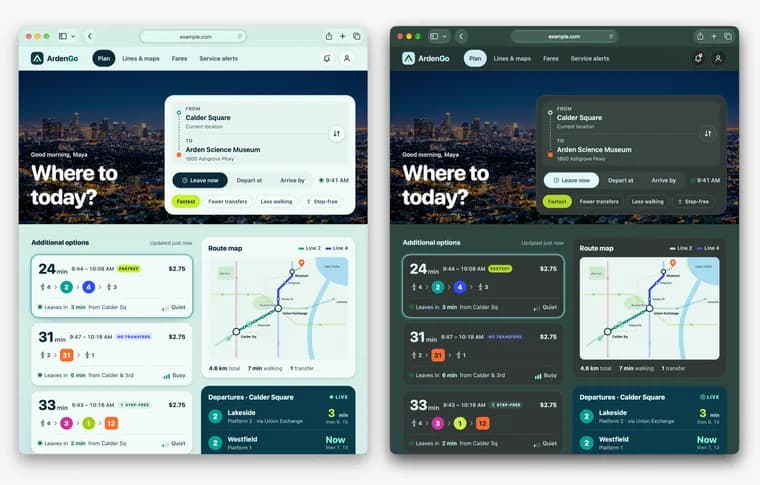
The WebKit blog has announced Adaptive Dark Mode in the Safari 27.3 beta. When a user enables it, Safari adapts light websites and presents them as dark.
The post frames the feature as a response to a gap in the web. Safari 12.1 became the first browser to support dark mode on the web in spring 2019, but not every site has a dark version. According to the post, almost 40% of web page loads come from users in dark mode, yet only 10% of page loads support it. Adaptive Dark Mode is meant to close that gap and give a consistent dark experience across the web.
To try it, the system appearance must be set to dark. The user then opens a site with a bright background, Safari offers a preview of Adaptive Dark Mode, and the user taps Try.
Sites that signal dark mode support, either with the color-scheme meta tag (content set to light dark) or the color-scheme: light dark CSS property, are not changed at all. For every other site, Safari quickly analyzes the page's colors and estimates whether it is mostly light or mostly dark. A page that already has a dark background with light text is left as is. A light page is made dark.
The core of the feature is a transformation of color. WebKit developed a color matrix that inverts the luminosity of colors while preserving hue, which turns light backgrounds dark and dark text light. For text color, it aims for sufficient contrast as defined by the WCAG 4.5:1 contrast ratio. Light CSS gradients are also made dark. The post says the feature judges when to invert colors so that buttons keep contrast against backgrounds, text stays visible over images and hover menus look clear.
Images get separate handling. Most are left unchanged. Because icons and logos can lose contrast when the background behind them is inverted, Safari inspects SVG images and transforms their colors when needed. For bitmap images it analyzes pixel histograms and inverts simple black-and-white logos. Effects such as masks and mix-blend-mode can give bad results on elements whose colors have been transformed, so in some cases they are turned off. Canvas content is left unchanged, because canvases hold a wide range of content that is hard to predict. WebKit says that doing this deep in the browser engine lets it apply the transformations with great speed and power efficiency while protecting privacy.
For site owners, the post says a page generally works well if it follows good modern practice. For older sites it suggests swapping bitmap logos and icons for SVG, using solid or gradient CSS colors instead of tiled background images, replacing image sprites with CSS for rounded corners, shadows and button states, making content images with transparent backgrounds rather than baking in the page color, and adding padding to containers to prevent crowding. To get a specific dark look for part of a page, apply color-scheme: light dark to that element and add your own dark styles. For full control, the post recommends building real dark mode support with the color-scheme meta tag or property, prefers-color-scheme media queries, picture sources with a dark media condition, and light-dark(), plus newer CSS functions such as color-mix() and contrast-color(). The color-scheme declaration should be in the HTML head or on :root or body in CSS, not injected later through JavaScript.
Sites that do not want to be transformed can use color-scheme: light only, as a meta tag or in CSS, where it can target specific elements or the whole page. The post notes that the only keyword is not supported in Safari 27.3 beta 1 and says to check back as the feature evolves through the beta.
On privacy, Safari prevents websites from detecting whether Adaptive Dark Mode has been applied. Apple's stated reasoning is that detectability would increase fingerprintable information and weaken privacy protections against trackers. JavaScript that queries CSS colors gets the original authored colors, and images drawn into a canvas render in their original form.
Site owners who want to discuss how the feature affects their project can write to web-evangelist@apple.com. Users who find a site that does not work well are asked to file a report with Feedback Assistant.
Key facts
- Safari 27.3 beta adds Adaptive Dark Mode: when a user enables it, light websites are presented as dark.
- WebKit says almost 40% of page loads come from users in dark mode, while only 10% of page loads support it.
- Sites that declare support with the color-scheme meta tag or CSS property are left unchanged; other pages are analyzed and only light ones are darkened.
- The transform uses a color matrix that inverts luminosity and keeps hue, aims for the WCAG 4.5:1 contrast ratio for text, and treats SVG, bitmap logos and canvas differently.
- Safari hides from websites whether the mode is applied, to avoid adding fingerprintable information; the light only opt-out does not work in beta 1.
Why it matters
Safari was the first browser to support dark mode on the web, in spring 2019, but support depends on each site. WebKit's own figures put the gap at almost 40% of page loads from users in dark mode against 10% of page loads that support it. Adaptive Dark Mode moves the work into the browser: instead of waiting for every site to ship a dark theme, Safari darkens light pages itself, and does so inside the WebKit engine rather than through a page-level hack.
Who it affects
Users who run their system in dark mode and keep hitting bright sites are the target. Site owners and web developers are affected too: a site that does nothing may now be shown darkened to users who enable the feature, and the post lists changes that help (SVG logos, CSS colors instead of tiled images, transparent content images, padding). Sites that already declare color-scheme support are untouched.
How to use it
As a user: try Safari 27.3 beta, set the system appearance to dark, open a website with a bright background, and tap Try when Safari offers the Adaptive Dark Mode preview. As a site owner: declare dark mode support with the color-scheme meta tag or the CSS property in the head or on :root or body, not later through JavaScript; or build full dark mode with prefers-color-scheme, light-dark() and related CSS; or apply color-scheme: light dark to one element and style it yourself. To ask Apple about your site, write to web-evangelist@apple.com. To report a broken page as a user, use Feedback Assistant.
How solid is it
The source is the WebKit blog, the engine team's own announcement, so the description of behavior comes first-hand. The feature is only in the Safari 27.3 beta, and the post gives no release date for the final version. The 40% and 10% figures are stated without a dataset, time period or list of browsers. Speed and power efficiency are claimed in words only; no performance numbers are given.
Risks and caveats
It is a beta: the post says to check back as the feature evolves through the beta process, and the light only opt-out (the only keyword) is not supported in Safari 27.3 beta 1. Automatic darkening is a judgment call, so the post itself admits that masks and mix-blend-mode effects are sometimes turned off and that canvas content is left unchanged. Because Safari hides from pages whether the mode is applied, JavaScript sees the original authored colors, which means a site cannot detect or adjust for the transformation. Apple asks users to report sites that do not work well.
“Adaptive Dark Mode is designed to close that gap, providing a consistent dark experience across the web.”
— WebKit blog, Introducing Adaptive Dark Mode