Sill streams any Mac window to iPhone and iPad with touch input
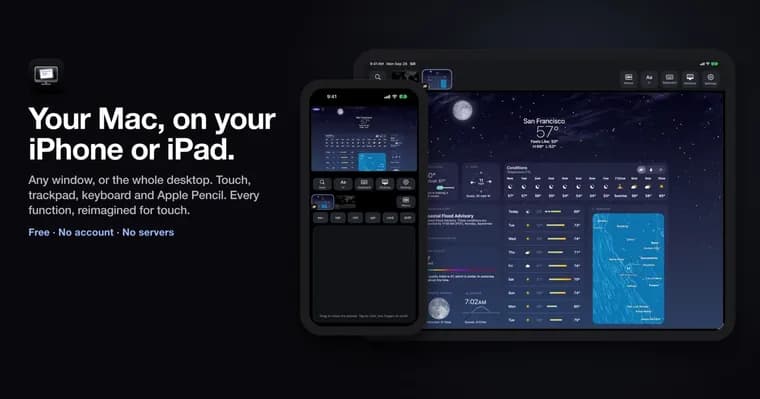
Sill, published on GitHub with a README by its developer, shows a window from your Mac, or the whole desktop, on an iPhone or iPad. You then use it on the device with touch, a trackpad, a keyboard or Apple Pencil. Sill for Mac captures the window, encodes it as HEVC video and sends it to the Sill app on the device. Taps, clicks, scrolls and keys go back to the Mac. The README says there is no account and no server in between.
The Mac and the device can connect in four ways: on the same network, over a USB cable, with Direct Wireless Connection when they share no network (off by default, peer-to-peer Wi-Fi the way AirDrop works), or through your own VPN such as Tailscale with Remote Access (also off by default; it can also use a port you forward on your router). On the Mac, Sill lives in the menu bar and captures with ScreenCaptureKit, encoding with VideoToolbox on the hardware encoder (or in software while that is busy). It captures nothing while no device is connected. The picture travels over an encrypted connection (TLS 1.3) straight to the device. When the encoder or the link falls behind, Sill drops frames rather than queue them, so the picture stays current. If the link cannot keep up, the Mac tells the device, which says so over the picture and offers a quality the link can carry.
Input goes back the same way: taps and clicks, scrolls with momentum, an on-screen trackpad, keys and typed text, and Apple Pencil as the pointer. Sill for Mac turns this into mouse and keyboard events, which needs the Accessibility permission. A keyboard attached to the device types on the Mac as soon as the picture shows, Esc included. Three-finger swipes and pinches work as on a Mac trackpad: Mission Control, App Exposé, Spaces, Apps and Show Desktop, through the Mac's own keyboard shortcuts. The menus of the app you are using reach the device too, in the iPad's own menu bar on iPadOS 26 or later and behind a Menus button in Sill's bar.
There are device-specific touches. On iPhone held upright, the picture sits on top with buttons, keys and a trackpad below, and a Larger Picture setting gives a window more room. An Aa control resizes the streamed window on the Mac so its text shows at the chosen size; the window goes back to its own size and place when Sill stops showing it. An optional virtual display (off by default) moves the streamed window onto a display of its own so it keeps updating when other windows cover it. On iPhone Duo, Sill follows the hinge: open flat, the Mac fills the inner display; half open, the picture is above the fold with a trackpad and keys below; closed, Sill runs on the cover display. The clipboard goes both ways while Share Clipboard is on, text only, up to 256 KB at a time. Sill never reads the device's clipboard by itself, and copies a password manager marks as concealed stay on the Mac.
Pairing is done once per device: tap the Mac on the device, then scan the code the Mac shows or type its 12 digits. Over USB the device pairs by itself. After that every connection is pinned to the paired keys. Only paired devices can connect unless Require pairing is turned off in Settings, in which case any device on the network can connect, still encrypted. A device away from home starts at Low quality at Standard resolution until another is picked.
Requirements are a Mac with Apple silicon on macOS 14 or later and an iPhone or iPad on iOS 17 or iPadOS 17 or later. Sill for Mac is a free, notarized download from getsill.app, or installs with Homebrew; the iPhone and iPad app is free on the App Store. Sill is free with no ads, no tracking and no subscription; an optional tip through GitHub Sponsors helps pay for the developer account and unlocks nothing. It is licensed under Apache License 2.0, copyright 2026 Noah Saffer. The README also covers building both apps from source with Xcode and contribution rules: Swift and Apple frameworks only, no third-party dependencies, nothing that needs a server, and latency before picture quality.
The README flags limits. Sill shows one window, or the whole desktop, at a time and does not play sound from the Mac. The Mac must be awake with Sill open, and Sill may not be able to wake it. And a security warning for old versions: with Sill for Mac 0.3.1 or earlier, connections on the local network, over the cable and over Direct Wireless Connection are not encrypted, and anything that reaches the Mac there can connect without pairing. The README says to update.
Key facts
- Sill streams one Mac window, or the whole desktop, to an iPhone or iPad as HEVC video; touch, trackpad, keyboard and Apple Pencil input goes back to the Mac.
- The README says there is no account and no server in between; the picture travels over TLS 1.3, and devices pair once with a code (scan it or type its 12 digits).
- Requires an Apple silicon Mac on macOS 14 or later and an iPhone or iPad on iOS 17 or iPadOS 17 or later; the Mac app is a free notarized download, the mobile app is free on the App Store.
- Licensed under Apache License 2.0, with no ads, no tracking and no subscription; an optional GitHub Sponsors tip unlocks nothing.
- Limits: one window or the desktop at a time, no Mac audio, text-only clipboard up to 256 KB, and Sill for Mac 0.3.1 or earlier does not encrypt local connections.
Why it matters
Sill targets a specific gap: using a Mac app from an iPhone or iPad with real input, not just viewing it. It supports touch, an on-screen trackpad, attached keyboards and Apple Pencil, and it forwards the Mac's multitouch gestures such as Mission Control and Spaces. The design choices stand out: no account, no server in between, free with no ads or tracking, and an Apache-2.0 licence. The README also describes remote use through the user's own VPN or a forwarded port instead of a hosted relay.
Who it affects
Anyone with an Apple silicon Mac on macOS 14 or later and an iPhone or iPad on iOS 17 or iPadOS 17 or later who wants to reach a Mac window from the device, at home or away through their own VPN. The README gives specific layouts for iPhone, iPad and iPhone Duo. Developers who want to contribute or build their own copy are covered too, under the project's conventions.
How to use it
Install Sill for Mac from getsill.app, or with brew install --cask saffsanity/sill/sill, and Sill for iPhone and iPad from the App Store. On the Mac, grant Screen Recording and Accessibility, plus Local Network on macOS 15 or later. On the device, allow Local Network, and the camera if you want to scan the pairing code. Tap your Mac on the device, then scan the code or type its 12 digits. Building from source needs Xcode 27 (27.1 or later for the iPhone and iPad app); the Mac app builds with Scripts/make-app.sh --install --open. Direct Wireless Connection, Remote Access and the virtual display are off by default and are switched on in settings.
How solid is it
This is the developer's own README, so the claims are the project's description of itself, not independent testing. The Mac app is notarized and the project is public under Apache-2.0. The README gives no latency, frame-rate, bitrate or resolution figures, and no release date, download count or reviews. It also names no independent security audit. The README itself is detailed about versions: pairing at home arrived with Sill for Mac 0.4.0 and the iPhone and iPad app 0.5, and since 0.5.1 both apps share one version number.
Risks and caveats
Sill needs Accessibility and Screen Recording permission on the Mac, which is how it clicks, types and shows windows. If Require pairing is turned off, any device on the network can connect, though still encrypted. Sill for Mac 0.3.1 or earlier does not encrypt local, cable or Direct Wireless connections and lets anything that reaches the Mac connect without pairing, so the README says to update. Running the SillHost command-line tool without --pairing opens a plain, unencrypted door, meant for development only. The virtual display uses a private macOS API, one reason the Mac app is not on the Mac App Store. Functionally, Sill shows one window or the desktop at a time, plays no Mac sound, needs the Mac awake with Sill open, and carries text-only clipboard data. No support for Windows, Linux or Intel Macs is mentioned; Apple silicon is required.
“There is no account and no server in between.”
— Sill README on GitHub