ZapFast, an unofficial Rust WhatsApp desktop client, claims 200 MB idle RAM
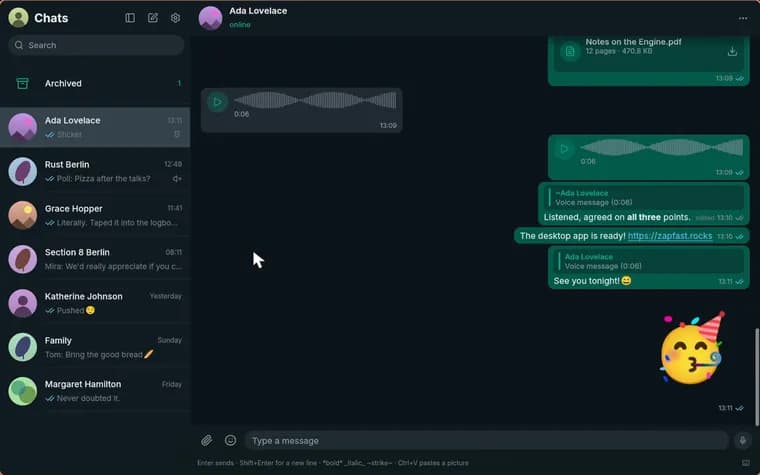
ZapFast is a desktop WhatsApp client for Linux, macOS and Windows, published on GitHub under the MIT License. It is written in Rust with egui and fastframe, which the README describes as the framework behind a family of native desktop apps. It has no browser engine. Instead, it links to a user's phone as a companion device through the whatsapp-rust library.
The headline claim is about weight. The README says that in the authors' Linux test the app opens in under a second and uses about 200 MB of idle RAM, against 1.13 GB for WhatsApp Web. The README points to a separate page of measurements for the details.
Setup mirrors WhatsApp's usual linked-device flow. On first launch ZapFast shows a QR code. On the phone, the user opens WhatsApp, then Settings, Linked devices, Link a device, and scans the code. Alternatively, they can click Link with phone number and enter an eight-character code on the phone. After linking, recent chats arrive from the phone and older messages load as the user scrolls up. The link survives restarts, and the phone does not need to stay online for the user to read what ZapFast has already stored.
The interface is available in ten languages or variants: English, Chinese (Simplified and Traditional), French, German, Indonesian, Italian, Portuguese (Brazil), Russian, Spanish and Turkish. Native notifications go through fastframe on all three systems. ZapFast keeps its own account and chat routing, privacy settings, notification limits and sound previews. Clicking a notification opens the announced message, and reading a chat withdraws its tracked notifications. OS permissions and notification presentation still apply.
A demo mode lets people look at the interface without a WhatsApp account, started with cargo run --features demo -- --demo. The repository also points to CONTRIBUTING.md, AGENTS.md (architecture), DEMO.md and PACKAGING.md, and the full guide lives at zapfast.rocks. The README names a sibling project, Spotifast, a Spotify client also built on fastframe.
The README is blunt about the legal position. ZapFast is an unofficial client and is not affiliated with WhatsApp or Meta. Using an unofficial client may be against WhatsApp's terms of service and could get an account suspended, and the README says to use it at your own risk. Third-party assets include the Inter typeface, Noto Color Emoji (OFL) and Lucide icons (ISC); the notification sounds are Pidgin's, under GPL-2.0.
Key facts
- ZapFast is an unofficial, MIT-licensed WhatsApp desktop client for Linux, macOS and Windows, written in Rust with egui and fastframe, with no browser engine.
- In the authors' own Linux test it opens in under a second and uses about 200 MB of idle RAM, against 1.13 GB for WhatsApp Web.
- It links to the phone as a companion device through whatsapp-rust, using a QR code or an eight-character code; the link survives restarts.
- The interface ships in ten languages or variants, and a demo mode runs without a WhatsApp account.
- The README warns the client is not affiliated with WhatsApp or Meta and that using it may breach WhatsApp's terms and get an account suspended.
Why it matters
WhatsApp Web runs in a browser, and the project's pitch is that a native client avoids that cost. The authors put numbers on it: about 200 MB of idle RAM for ZapFast against 1.13 GB for WhatsApp Web, with a start in under a second. ZapFast is also presented as one of a family of native apps built on the same fastframe framework, alongside the Spotify client Spotifast.
Who it affects
People who use WhatsApp on a Linux, macOS or Windows desktop and want something lighter than a browser tab. Developers who work in Rust and egui may also find the code and the fastframe framework of interest, and the repository invites contributions through CONTRIBUTING.md.
How to use it
Open ZapFast and scan the QR code from WhatsApp on the phone (Settings, Linked devices, Link a device), or choose Link with phone number and enter the eight-character code on the phone. Recent chats then arrive, and older messages follow as you scroll. To look around without an account, run cargo run --features demo -- --demo. The project is MIT-licensed. The README links to Download and Getting started pages, and the full guide is at zapfast.rocks.
How solid is it
The speed and memory figures come from the authors' own Linux test, as stated in the README. The text gives no hardware, browser or method details for it, and no independent check. No figures are given for macOS or Windows. The README does not name the maintainers, and gives no release date or version number.
Risks and caveats
The README itself warns that using an unofficial client may be against WhatsApp's terms of service and could get an account suspended, so the risk falls on the user. The client is not affiliated with WhatsApp or Meta. The source text does not say that WhatsApp or Meta has taken action against ZapFast or its users. The project also depends on the third-party whatsapp-rust library to talk to the service.