Android's Create My Widget is fun but misses on live bus times
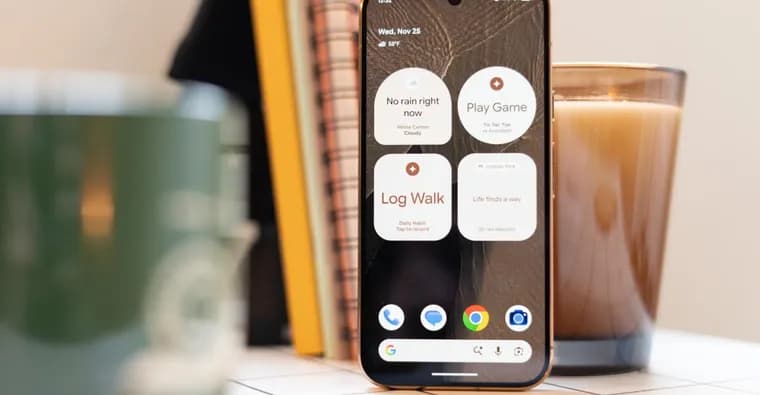
A writer for The Verge tested Create My Widget, a beta feature in Android's suite of "Gemini Intelligence" tools that builds custom home screen widgets with AI. Google announced AI-made widgets at I/O in the spring, and the feature only started rolling out to Pixel phones earlier this month. The author's main goal was practical: a glanceable widget showing real-time arrivals at the bus stop near home, because opening an app and picking the stop takes long enough to miss a bus.
The first experiments, on a Pixel 11 Pro, went well. One widget shows a different quote from the original Jurassic Park film every hour. It took about 20 seconds to make. Tapping it opens a thread in r/MovieQuotes, which the author took as a sign that not much software magic is going on underneath. Another widget displays "Tut tut, looks like rain" whenever it is raining and "No rain right now" otherwise. The author calls it silly and useless apart from the happiness it brings, and expects plenty of use from it in Seattle.
The interface suggests ideas and categories that lean practical, such as habit trackers and recipe inspiration. The author asked for a widget to log a week of daily walks, hoping for something visual that would encourage keeping a streak. The result was a tile labeled "Log Walk" that, when tapped, triggers Gemini to add a walk to the calendar. Gemini did suggest an extra step: a checklist for marking off each day's walk.
Many of the widgets, the author found, are basically shortcuts to Gemini prompts. A tap pulls up the Gemini interface on the home screen, it thinks for a while, then produces the requested result. The options also seem to fit well-defined templates, such as a countdown to a holiday or calendar event, or a favorite sports team's recent score and next game time. More open-ended requests, like a new three-ingredient cocktail recipe every day, pull from Google search results or prompt Gemini to work it out. The author had hoped for customizable mini apps and found something closer to a one-size-fits-all feature.
That is where the bus widget fell short. Asked for a list of real-time arrivals, the feature produced a "Bus Arrivals" tile that uses Gemini to search for times at the specified stop. The answer was a wordy account of how often the bus runs and when it might arrive based on the schedule. The author judged Gemini helpful for some things but useless for this, while still having a good time making the other widgets.
Key facts
- Create My Widget is a beta Gemini Intelligence feature that only started rolling out to Pixel phones earlier this month, after Google announced AI-made widgets at I/O in the spring.
- On a Pixel 11 Pro, an hourly Jurassic Park quote widget took about 20 seconds to make.
- Many widgets are basically Gemini prompt shortcuts, and the available types seem to follow well-defined templates such as countdowns and sports scores.
- A request for a visual walk tracker produced a "Log Walk" tile that has Gemini add a walk to the calendar.
- The requested real-time bus widget instead returned a wordy, schedule-based answer from Gemini.
Why it matters
Create My Widget lets people ask AI for a home screen widget, an idea Google presented at I/O in the spring and has now begun putting on Pixel phones in beta. The Verge's author was excited partly because it raises questions such as what an app is and where it lives. In this hands-on test, the answer was more modest than customizable mini apps: many widgets are essentially a route into Gemini.
Who it affects
Pixel phone owners are the first in line, since the beta has started rolling out to those phones. It is likely to suit people who want playful or simple items on their home screen, such as rotating quotes, countdowns or team scores. People who need glanceable live data should temper expectations: the author's real-time bus request did not work.
How to use it
You describe the widget you want, and the interface also offers ideas and categories, including habit trackers and recipe inspiration. Examples from the article include a countdown to a holiday or calendar event, a favorite team's recent score and upcoming game time, an hourly movie quote, a rain message and a daily three-ingredient cocktail suggestion. Open-ended requests draw on Google search results or prompt Gemini, so tapping such a widget may open Gemini and involve a wait before the answer appears.
How solid is it
This is a light, first-person hands-on from one writer at The Verge, testing a beta feature on a Pixel 11 Pro. The judgments are the author's own and rest on a handful of widgets. The 20-second creation time refers to the Jurassic Park widget alone. The observations about templates and Gemini shortcuts describe what the author saw, with the template point worded as an impression.
Risks and caveats
A widget's label can promise more than it delivers. "Bus Arrivals" returned frequency and schedule-based expectations instead of live times, and "Log Walk" was a calendar action with none of the visual streak tracking the author hoped for. The feature is still in beta. The article's own framing is that making widgets can be a good time as long as you do not expect too much.
“I was hoping for mini apps I could customize to my liking, but this is more of a one-size-fits-all feature.”
— The Verge's author, on Create My Widget