AWS Trainium profiling guide: TorchNeuron fusion cuts RMSNorm device time to one-sixth
A blog post on Hugging Face, the first part of a series on profiling TorchNeuron, teaches system-level profiling of inference on AWS Trainium. Trainium is described as a purpose-built AI chip for deep learning training and inference workloads, and TorchNeuron as its open source native PyTorch backend. The post starts from scratch and assumes no prior profiling experience. Its premise: many ML practitioners have some intuition about how to make models fast, but fewer know how to analyze why a model is slow.
The post says TorchNeuron supports standard PyTorch workflows on Trainium, including eager execution, torch.compile and standard PyTorch APIs, with minimal code changes. It also integrates with the Neuron Kernel Interface (NKI) for custom operators. Under the hood, the Neuron backend uses PyTorch's PrivateUse1 extension point, which lets an accelerator integrate with the framework without a dedicated dispatch key such as cuda. The torch_neuronx package registers Neuron as a native backend.
Setup uses two objects. NeuronConfig controls which data streams and NeuronCores to capture and where to write output; it is passed to torch.profiler.profile as experimental_config. NeuronProfiler takes that config and provides an export_trace callback that writes the framework trace (trace.json) alongside the Neuron system traces. The example config uses modes DEVICE and RUNTIME, captures NeuronCore 0, and sets correlate_device_time=True so device time shows up in the key_averages() table next to CPU time. The profiler call needs ProfilerActivity.PrivateUse1 to collect Neuron device activity. The schedule is wait=2, warmup=1, active=1 across four prof.step() calls, which records one warm iteration without setup overhead. The loop must call torch.neuron.synchronize(); without it, the profiler can export before the device finishes and leave the Neuron time column empty.
The viewer is Neuron Explorer, a browser-based tool for the system trace, device timeline and per-engine breakdown, reachable through an SSH tunnel or a Visual Studio Code extension. Profiling output includes matched .neff files (the compiled Neuron executable) and .ntff files (the hardware instruction trace), paired by a shared numeric hash.
The worked example profiles RMSNorm on a 4 x 512 bfloat16 input, with the same inputs, profiler configuration and schedule for all three versions.
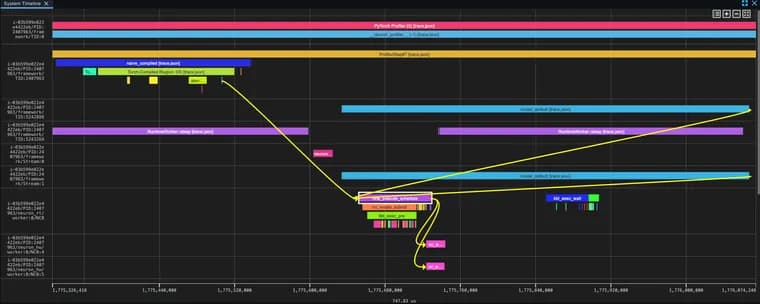
Profile 1 is naive RMSNorm with individual PyTorch operations (multiply, mean, add, reciprocal square root, multiply). The key_averages() table, sorted by self_privateuse1_time_total, shows three aten::mul calls taking the largest share of Neuron device time, because the function multiplies three times (x * x, x * rms, and the final multiplication by weight). aten::add adds epsilon and triggers a host-to-device copy because the scalar starts on the CPU. Self NEURON total: 2.355 ms. In Explorer, each operation shows the same pattern: creation in the framework lane, scheduling in the runtime lane as nrta_execute_schedule, and execution in the hardware lane as nc_exec_running. A dependency chain viewer follows one aten::mul.Tensor through these layers.
Profile 2 uses torch.rms_norm, which Neuron lowers to one fused kernel. It appears as a single device operation with one dispatch and one hardware event and no gaps between component operations. Self NEURON total: 403.3 μs.
Profile 3 compiles the original naive function with torch.compile(backend='neuron', fullgraph=True). TorchDynamo captures the bytecode as an FX graph and AOTAutograd lowers it to ATen operations. The Neuron backend receives the whole graph, fuses the operations, optimizes memory access and compiles a single NEFF artifact that runs as one hardware dispatch. It appears as one Torch-Compiled Region. Self NEURON total: 375.5 μs. The post calls this comparable to torch.rms_norm, at 375 μs compared with 403 μs in this run.
The summary: both fused approaches take about one-sixth of the naive implementation's device time in these runs. Fusion removes the gaps between hardware executions and avoids materializing intermediate values such as x_sq and mean_sq between separately dispatched operations. The suggested workflow for larger models is to find a hotspot in the table, verify it in the trace, then decide whether a fused operation or torch.compile can reduce its cost. Part 2 will move to the device-level profile: opening the NEFF, inspecting TensorEngine, VectorEngine and direct memory access (DMA) breakdown, and placing the kernel on the roofline to determine whether it is compute-bound or memory-bound. Scripts to reproduce the work are in the torch-neuronx examples directory.
Key facts
- The post walks through profiling inference on AWS Trainium with torch.profiler, the key_averages() table and Neuron Explorer, assuming no prior profiling experience.
- Naive RMSNorm built from individual PyTorch ops recorded a Self NEURON total of 2.355 ms, with three aten::mul calls taking the largest share.
- torch.rms_norm (one fused Neuron kernel) recorded 403.3 μs, and the naive code under torch.compile with the neuron backend recorded 375.5 μs.
- In these runs either fused approach took about one-sixth of the naive version's device time; the input was a small 4 x 512 bfloat16 tensor.
- Call torch.neuron.synchronize() inside the profiler loop, or the Neuron time column can come out empty.
Why it matters
Knowing that a model is slow is easier than knowing why. The post gives a concrete, repeatable method on Trainium: find the costly operation in the key_averages() table, confirm it in the Neuron Explorer trace, then test whether a fused operation or torch.compile helps. The RMSNorm example makes the payoff visible: the same computation went from 2.355 ms to roughly 375 to 403 μs of device time once it was dispatched as one fused kernel.
Who it affects
ML practitioners who run or plan to run PyTorch inference on AWS Trainium, especially those new to profiling. The post is pitched at readers with no prior profiling experience, and its last section points to larger models as the next step.
How to use it
Create a NeuronConfig (modes, output directory, NeuronCore to capture, correlate_device_time=True) and pass it as experimental_config to torch.profiler.profile, with ProfilerActivity.PrivateUse1 among the activities and NeuronProfiler's export_trace as the callback. Use a schedule of wait=2, warmup=1, active=1 over four steps, call torch.neuron.synchronize() each step, then print prof.key_averages().table sorted by self_privateuse1_time_total. Open the output directory in Neuron Explorer (via SSH tunnel or the VS Code extension); for a device-only profile, upload the matching .neff and .ntff files. Reproduction scripts are in the torch-neuronx examples directory.
How solid is it
It is a walkthrough with code and measured figures, and the numbers are internally consistent. The measurements come from one small case, RMSNorm on a 4 x 512 bfloat16 tensor, and the post frames its results as 'in these runs'. It calls the torch.compile and torch.rms_norm times comparable, so the 375.5 μs versus 403.3 μs gap should not be read as one approach being generally faster. The post gives no comparison with GPUs or other accelerators and states no Trainium generation, instance type or software versions.
Risks and caveats
The one-sixth figure comes from a tiny operation and may not carry over to larger models; the post only suggests applying the same workflow there. Skipping torch.neuron.synchronize() can leave the Neuron time column empty. Part 2, covering the device-level profile, has no stated release date, so the picture of compute-bound versus memory-bound behavior is not yet complete.