Blogger keeps a Lenovo X1 Carbon alive with Linux memmap after soldered RAM fails
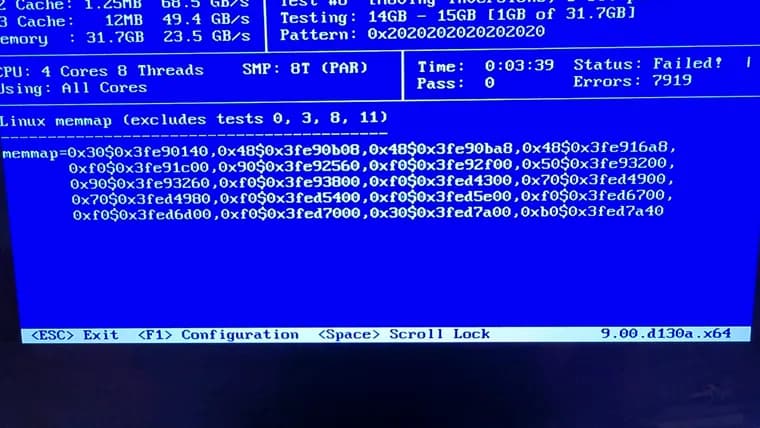
The author of a personal blog describes what happens when the RAM in a modern laptop goes bad and cannot be swapped. His work laptop is a Lenovo X1 Carbon, bought in 2021 and running Fedora. Lately more browser tabs had been crashing, and now and then the root filesystem marked itself read-only. The kernel log showed BTRFS checksum failures, which made him suspect memory. He added a Memtest86+ image to his Ventoy USB stick and booted it. The tool writes patterns to every physical memory address it can reach and reads them back; it showed a bunch of errors almost immediately.
In the past, he says, that result would have pointed to a faulty DIMM, which he could have replaced or upgraded. But RAM is now soldered directly to the motherboard of most laptops (he names the Framework as an exception), so unless you are skilled at replacing ball grid array chips, replacement is not really an option. He blames the pursuit of thinner laptops, since a DIMM socket adds about 6mm of depth, and adds, cynically, that soldering may also ensure any failure means buying a whole new laptop. He calls the trend "truly evil", especially with shortage-induced high prices. He accepts that after five years of depreciation it is probably time for a new laptop, and says he will write about the replacement later. But he wants to keep the X1 Carbon going, since it is still capable and could take over from the older Dell XPS 13 he uses as his personal laptop.
While waiting for the new machine, he looked for a way to make the old one stable. His research turned up two Linux kernel options for avoiding bad memory: badram and memmap. Badram is an out-of-tree patch usually shipped only in Debian and Ubuntu based distributions, so it was no use on Fedora. Memmap is a core kernel feature and should be available on Fedora. It takes a list of lengths and offsets on the kernel command line in the form length$offset.
Memtest86+ can output the right format for both options and save it to a file, but he could not get that working with the ISO on his Ventoy stick. He photographed the screen and transcribed the values by hand, which he calls "fun". The list he ended up with has about twenty entries, mostly small regions near the 0x3fe90000 and 0x3fed4000 addresses.
The documentation says to add the values to GRUB_CMDLINE_LINUX in /etc/default/grub and run grub2-mkconfig. He did that, and the machine failed to boot. From the GRUB screen he saw the command line it had tried to use: it looked as if the $0 in each memmap entry had been replaced by grub2-mkconfig, which he compares to classic environment-variable substitution, since $0 usually means the script name.
A RedHat bug describing a similar problem offered the fix. He stored the whole value in a grubenv variable called memmap_val with grub2-editenv, then changed GRUB_CMDLINE_LINUX to reference that variable instead of holding the raw values, and ran grub2-mkconfig again. This time the laptop booted, and /proc/cmdline showed the correct memmap values on a Fedora 44 kernel (vmlinuz-7.2.11-200.fc44.x86_64).
He saved the memmap values in a text file on a USB stick so he can re-apply them after a full reinstall. He expects this to keep the laptop running until the new one arrives, and hopefully a bit longer. His next steps are to back everything up and then run btrfs check --fix to see whether he can repair the filesystem metadata.
Key facts
- A Lenovo X1 Carbon bought in 2021 and running Fedora began crashing browser tabs and remounting its root filesystem read-only; Memtest86+ showed errors almost immediately.
- The RAM is soldered to the motherboard, so he could not swap a DIMM; he blames the drive for thinner laptops (a DIMM socket adds about 6mm) and, cynically, forced replacement.
- He used the kernel's memmap option, which is core and available on Fedora, instead of badram, an out-of-tree patch usually shipped only in Debian and Ubuntu based distributions.
- grub2-mkconfig appeared to substitute the $0 in the memmap entries and the laptop failed to boot; storing the value in a grubenv variable (memmap_val), as a RedHat bug suggested, fixed it.
- Next he plans to back up and run btrfs check --fix; the memmap workaround is expected to last until a replacement laptop arrives, and hopefully a bit longer.
Why it matters
The post shows a concrete cost of soldered RAM: a fault that once meant swapping one DIMM now means a dead or unreliable machine. The author's explanations for the trend are thinner laptops (a DIMM socket adds about 6mm of depth) and, in his cynical speculation, making failures force a whole new purchase. The practical value is the workaround: Linux can be told to skip bad memory regions, and the post walks through a GRUB pitfall that otherwise leaves the machine unbootable.
Who it affects
Owners of laptops with soldered RAM, which the author says is most laptops now, with the Framework as an exception. It is most directly useful to Linux users, particularly on Fedora, who find memory errors on such a machine and want to keep it running. It also touches anyone weighing laptop repairability when buying, given the author's complaint about shortage-induced high RAM prices.
How to use it
The steps as the author describes them: boot Memtest86+ to confirm errors and get the bad address ranges; produce them in the length$offset format that memmap expects (he photographed the screen and typed the values in, because saving to a file did not work from his Ventoy ISO). Do not paste the raw values into GRUB_CMDLINE_LINUX, because grub2-mkconfig appeared to replace the $0 in each entry and the machine would not boot. Instead, per a RedHat bug, set a grubenv variable named memmap_val with grub2-editenv, reference that variable in GRUB_CMDLINE_LINUX in /etc/default/grub, and rerun grub2-mkconfig -o /boot/grub2/grub.cfg. Then check /proc/cmdline for the correct values. He also keeps the values in a text file on a USB stick in case of a reinstall. Badram is the alternative, but it is an out-of-tree patch usually shipped only in Debian and Ubuntu based distributions.
How solid is it
This is a single first-person account from a personal blog, with real log lines, the GRUB configuration and the resulting /proc/cmdline shown. The author is not named in the post. The boot fix is demonstrated: the machine booted and the correct values appeared in /proc/cmdline. How long the workaround holds up, or whether the crashes stopped, is not reported, and the author himself only says it should keep things running until the new laptop arrives and hopefully a bit longer. The cause of the RAM failure is not stated.
Risks and caveats
This is a stopgap, not a repair. The author says it should last until the replacement arrives, and he already treats the laptop as due for replacement. The filesystem showed checksum failures, and he plans to back up and then run btrfs check --fix to try to sort out the metadata; no result of that is reported. Transcribing addresses by hand from a photo is error-prone, as he admits. Memmap lists must be entered carefully, since a wrong command line can leave the machine unbootable, as his first attempt did. His claims about manufacturers' motives are his own speculation.
“The trend for soldered on RAM in modern laptops is truely evil especially in these current trying times of shortage induced high prices.”
— The blog post's author (name not given in the post)