ChatGPT Work runs 223 tools and 44 skills, author finds
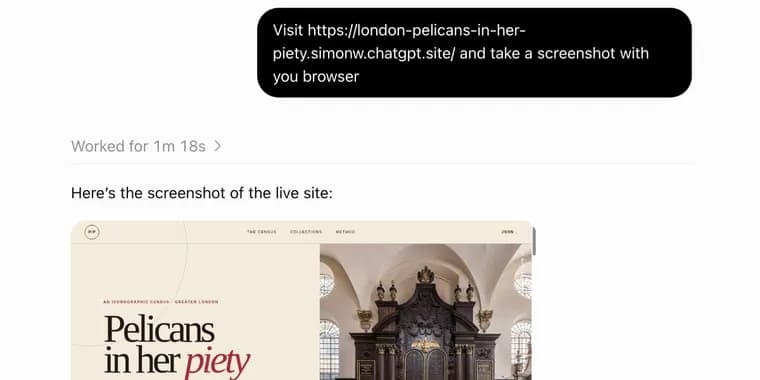
OpenAI announced ChatGPT Work on July 9, 2026, and has kept iterating on it since. In a post published August 30, 2026, an independent investigator lays out what the product actually does, since OpenAI's own documentation describes only use cases, not mechanics. ChatGPT Work turns out to be two separate products. "Work Cloud" runs in the cloud, reached through chatgpt.com or the ChatGPT mobile apps, and is the more interesting of the two. "Work Local" is reached by installing the ChatGPT desktop app, formerly called Codex, which lets the assistant read files and run programs directly on the user's own computer; it feels like a re-skinned Codex aimed at non-developers. The article covers only Work Cloud.
Access is restricted to paying subscribers at $20 a month and up; free users and $8 a month Go subscribers do not get it. OpenAI presents Work as an alternative to Chat through a tab selector, and its official guidance is to use Chat for an answer, explanation, brainstorm or short draft, and to use Work when the goal is a task with a clear outcome, such as a brief, deck, analysis, recurring update, workflow or reviewable file. The author finds that guidance nearly useless, since Chat has handled exactly those task types for years, and instead sets out to find which features Work actually has that Chat lacks.
Testing surfaces seven distinguishing features: the option to use "Luna" and "Terra" model variants in place of the default "Sol"; a code execution environment with internet access; a full headless Chrome browser; a persistent filesystem shared across sessions; the ability to publish ChatGPT Sites; the ability to run sub-agent sessions with Sol, Luna and Terra; and scheduled prompt automations, which an update to the post later notes also work in plain Chat.
On model selection, Work offers GPT-5.6 Sol, Luna or Terra, each at Light, Medium, High, Extra High, Max or Ultra reasoning, plus GPT-5.5 at up to Extra High; these appear to match what is available through the OpenAI API. Chat instead offers 5.6 Instant, Medium, High, Extra High and Pro, with Extra High and Pro reserved for $100-a-month-and-up subscribers ($20-a-month subscribers cap out at High); 5.6 Pro has no Work equivalent. The author's current understanding, based on prior experience with Codex, is that "Ultra" is a mode that delegates more eagerly to sub-agents, and believes, without confirmation, that Work sessions bill against the user's Codex allowance while Chat sessions draw on a separate allowance of their own, which might explain the model gap.
The code execution environment is, in the author's view, the standout feature: unlike Chat's sandbox, which blocks outbound access to install packages or reach outside sites and APIs, Work's environment can talk to the open internet. It can be configured with a specific allowlist of domains, but the default appears to be open to everything, letting a session clone a GitHub repository, install its dependencies, and use it to interact with the rest of the web. By comparison, Claude's equivalent code container has offered restricted internet access since it launched last September, but only for installing packages from PyPI and npm and cloning GitHub repositories, with a very short domain allowlist beyond that.
The browser tool launches a full headless Chrome instance that can load sites, fill out forms, take screenshots and run JavaScript against a page's DOM. If a site needs a login, the browser can hand control to the user to enter passwords and two-factor codes directly, without those credentials passing through the model. As a demonstration, the author asked it to load simonwillison.net and extract the page's headings with a JavaScript snippet, which it executed against the live DOM.
Where Chat gives each session a fresh, isolated filesystem, Work gives each session its own scratch folder under /workspace/scratch (one example name given is /workspace/scratch/e00a0a017944) that persists across sessions; the author has accumulated 171 such folders. The /workspace volume appears mounted across all currently running Work sessions, so file edits in one are instantly visible in others, though sessions do not share a process space, so a localhost server started in one session cannot be reached from another.
ChatGPT Sites lets Work build and deploy full websites on Cloudflare Workers, including server-side, stateful features built on Cloudflare D1 and R2. As a demo, the author had it research every depiction in London of "a pelican in her piety," a piece of medieval Christian imagery, then turn the results into a small published site. Sites default to private but can be made public or, on team plans, shared with specific people.
Work can also run sub-agent sessions using Sol, Luna and Terra, something Chat cannot do, aimed at complex projects that benefit from multiple agents working in parallel. It supports scheduled prompt automations too, for example a daily 8am check on whether Waymo has announced a Half Moon Bay launch date, which can either report that nothing changed or notify the user of new information; a scheduled task can also be set to refresh a ChatGPT Site on an hourly basis.
On safety, the author invokes the "lethal trifecta" model, in which an agent combining access to private data, exposure to untrusted content and a channel for exfiltrating information becomes dangerous, and notes that Work combines all three. The author wants to hear more from OpenAI about how Work sessions are protected against prompt injection, and expects, without confirmation, that the answer mirrors Codex's existing auto-review mechanism.
Frustrated that OpenAI documents Work by use case rather than mechanism, and keeps its system prompt and tool descriptions private, the author prompted a fresh Work session to build a website cataloguing every one of its own tools, grouped by category, with each tool's function explained. The resulting site listed 223 registered tools, 6 of which came from the author's own personal MCP servers served via datasette-mcp rather than being native to Work. Noticing that the only browser-related tool listed was web.run, which covers searches, opening URLs and clicking links but not full browser automation, the author suspected something was missing and prompted the same session to add full copies of every Skill to the site as well. That revealed ChatGPT Work uses 44 Skills. One, control-browser, documents that browser interaction runs through a browser-client runtime via an agent.browsers.* API, and instructs the agent that it must emit and read the complete output of await browser.documentation() before attempting to use it; at the author's request, that full documentation output was added to the site too. Other skills found include ones for creating .docx files, generating images via an image_gen tool, reading and rendering PDFs, manipulating spreadsheet files in .xlsx, .xls, .csv and .tsv formats, building ChatGPT Sites, answering questions about OpenAI's own product documentation, and building data dashboards.
Key facts
- ChatGPT Work, announced July 9, 2026, is actually two products: cloud-based "Work Cloud" and a local desktop version built on the former Codex app, called "Work Local."
- Access requires a $20/month or higher ChatGPT subscription; free users and $8/month Go subscribers are excluded, and only $100/month+ subscribers unlock Extra High and Pro reasoning in Chat.
- Work's code sandbox defaults to open internet access rather than a blocked or allowlisted one, unlike Chat's sandbox and unlike Claude's equivalent container, which only permits PyPI, npm and GitHub since last September.
- By prompting a Work session to document itself, the author found it exposes 223 registered tools (6 from personal MCP servers) and 44 Skills, none of it published by OpenAI.
- The author flags a "lethal trifecta" risk, since Work combines private-data access, exposure to untrusted web content and channels that could exfiltrate data, and wants OpenAI to explain its prompt-injection defenses.
Why it matters
ChatGPT Work is OpenAI's most capable agent surface yet, but the company documents it only by what it's for, not by what it does, leaving even an experienced user unable to say what the product actually contains until testing it directly. That gap matters because Work bundles real, high-privilege capabilities, an internet-connected code sandbox, a full browser, a persistent shared filesystem, and dozens of undisclosed tools and skills, behind marketing language, at a moment when a rival agent product, Claude's code container, draws a far tighter boundary around what its sandbox can reach.
Who it affects
Paid ChatGPT users at $20/month and up now have access to a materially different, more powerful surface than Chat and needed independent testing to learn what sets it apart, since OpenAI's own guidance describes only use cases. Developers and power users comparing agent platforms are affected too, given the contrast between Work's default-open internet access for code execution and Claude's restricted equivalent. Anyone routing sensitive data or credentials through Work is affected by the security questions the piece raises.
How to use it
Work requires a ChatGPT subscription of $20/month or higher, or the ChatGPT desktop app (formerly Codex) for the Work Local variant; it sits behind a tab selector next to Chat. Inside Work, users choose between GPT-5.6 Sol, Luna or Terra at one of six reasoning levels, or GPT-5.5 up to Extra High. It suits tasks that need an internet-connected code sandbox, live browser automation with user-handled logins, a filesystem that persists across sessions, a published Cloudflare-hosted mini site, delegation to sub-agents, or a recurring scheduled check.
How solid is it
The account is first-hand and hands-on: the author tested the features directly and had the product itself build a self-documenting site listing its own 223 tools and 44 skills, quoting one skill's internal documentation verbatim. Several claims are explicitly marked by the author as inference rather than confirmed fact, including that Work sessions bill against a separate Codex allowance, that "Ultra" delegates more eagerly to sub-agents, and that OpenAI's prompt-injection defenses mirror Codex's. No standalone price for Work itself is given, only which existing subscription tiers unlock or exclude it, and the article does not say when scheduled automations arrived in Work, only that they "migrated" over at some unspecified point.
Risks and caveats
The author's own "lethal trifecta" framing is the central risk flagged: Work combines access to private data, exposure to untrusted content from the open web and full browser, and channels capable of exfiltrating information, all in one session, with no confirmed detail from OpenAI on its prompt-injection defenses. The code sandbox's internet access defaults to open rather than allowlisted. The 223-tool figure includes 6 tools from the author's own personal MCP setup rather than being native to Work, and OpenAI has been "furiously iterating" on the product since its July 9 launch, so exact counts and behavior may already have shifted by the time of reading.
“Use Chat when you want an answer, explanation, brainstorm, or short draft. Use ChatGPT Work when you want ChatGPT to complete a task with a clear outcome, such as a brief, deck, analysis, recurring update, workflow, or file you can review and use.”
— OpenAI, in its official guidance on Work versus Chat