Firefox Smart Window adds AI form filling and webpage monitoring
Mozilla is updating Smart Window, Firefox's AI-powered browsing experience, with two new features. Both are rolling out to the Smart Window beta on desktop in the US and Canada, and The Verge reports they will reach other countries in the "coming months."
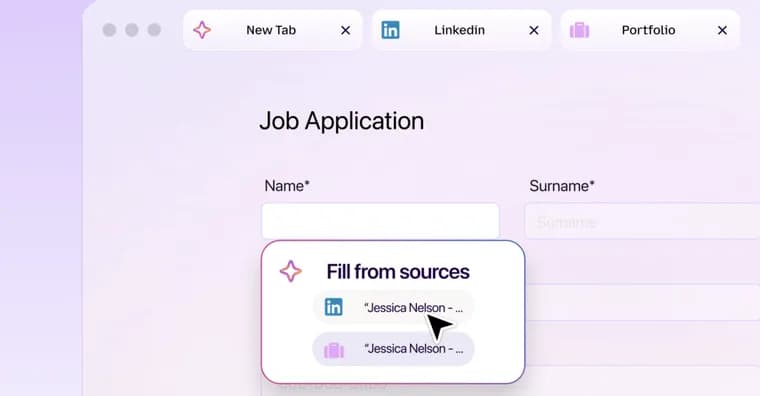
The first feature helps fill out online forms using the information in the user's open tabs. Mozilla's example: Smart Window can pull details from an online portfolio or LinkedIn page and paste a work history into a job application. To try it, the user clicks into a form with at least four text fields. An option labelled "Fill from sources" appears and shows all the tabs Firefox will draw from. The user can select or deselect tabs, and the browser then generates suggestions from the information in them. For now the feature supports text fields on web forms only; Mozilla is working on support for dropdown menus and PDFs. Mozilla notes that data from the source pages is shared with Google's Gemini 3.1 Flash Lite, the AI model that generates the text suggestions.
The second feature is webpage monitoring. Users can ask Smart Window to watch a page for sales, new job listings and other updates. A task is set up by typing "/watch" in the Smart Window chat, describing what to look for, and adding the pages to watch. Firefox then checks for updates daily or weekly, but only while the browser is open. When it detects the change, it sends a notification through the Tasks button on the toolbar, or on the desktop if desktop notifications are enabled. If no change turns up, Firefox pauses watching after 60 days and stops completely after 90 days.
Key facts
- Smart Window, Firefox's AI browsing experience, can now fill forms using information from the user's open tabs; the "Fill from sources" option appears on forms with at least four text fields.
- Form filling covers text fields only for now; Mozilla is working on dropdown menus and PDFs.
- Data from the source pages is shared with Google's Gemini 3.1 Flash Lite, which generates the suggestions.
- A new /watch command tracks webpages for sales, new job listings and other updates, checking daily or weekly and only while Firefox is open.
- Watching pauses after 60 days without a detected change and stops after 90 days. Both features are in the Smart Window beta on desktop in the US and Canada, with other countries in the "coming months."
Why it matters
Firefox is moving Smart Window from browsing help toward tasks done on the user's behalf: filling in forms from what is already open, and watching pages for changes. The form feature turns open tabs such as a portfolio or LinkedIn page into a source for job applications. The watch feature covers sales, job listings and similar updates without the user rechecking a page by hand.
Who it affects
Right now, people in the US and Canada who use the Smart Window beta on desktop. Users elsewhere are told to expect the features in the "coming months." Job seekers filling in applications and shoppers waiting for a sale are the two use cases named in the report.
How to use it
For forms, open the tabs that hold the information you want to use, then click into a form with at least four text fields. Choose "Fill from sources," select or deselect the tabs Firefox should use, and review the suggestions it generates. For monitoring, type "/watch" in the Smart Window chat, describe what you are looking for, and add the webpages to watch. Updates arrive through the Tasks button on the toolbar, or as desktop notifications if those are enabled.
How solid is it
This is The Verge's account of a Mozilla update, with the form-filling example attributed to Mozilla and the data-sharing note also coming from Mozilla. Both features are in a beta and limited to desktop in two countries. The report gives no pricing, and no information on whether the features are free or paid. It names no timeline for dropdown-menu or PDF support, and the wider rollout is described only as "coming months."
Risks and caveats
Source page data is shared with Google's Gemini 3.1 Flash Lite, so the information in the tabs you select leaves the browser to generate suggestions. The report describes no further privacy safeguards. Form filling handles text fields only, so dropdown menus and PDFs are not yet covered. Monitoring runs only while the browser is open, so a closed Firefox will not check pages. Watch tasks pause after 60 days without a detected change and stop after 90 days.