ImHex creator reverse engineers FEZ's save file format
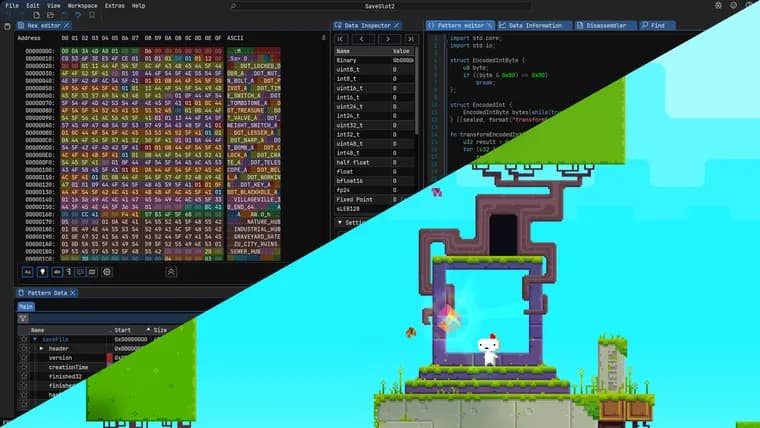
The developer of ImHex, a free and open source hex editor available on desktop and in the browser, published a tutorial explaining how to reverse engineer an unknown binary file format from scratch. He says he has repeatedly been asked how to do this and never had a good answer beyond "Look at the decompiled code of whatever program reads/writes these files and work backwards from there," so the post works through a full example instead: decoding the save file of the 2012 game FEZ.
He downloaded the Steam build of FEZ released on December 2, 2016, played until it created a save, then located the file (on Linux, under /home/werwolv/.local/share/FEZ/SaveSlot2) and opened it in ImHex. The raw bytes showed the data was uncompressed and unencrypted, but had no file magic and matched no format ImHex could identify automatically, leaving decompilation as the only path forward.
FEZ is written in C#, which he says is comparatively easy to reverse engineer with a decompiler like JetBrains Rider. Opening the game's binaries in Rider, he found the relevant class in EasyStorage's PCSaveDevice, whose constructor builds the filename from the string "SaveSlot" plus a slot index, confirming he had the right code. From there he traced the writing logic to a Save() function and, further, to SaveFileOperations.Write(), which lists every field the game serializes to disk. The Save() function always writes exactly 0xA000 bytes: it pads short data with zeros and throws an InvalidOperationException if the data is too long.
He then built the corresponding definition in ImHex's Pattern Language. A FezSaveFile struct is placed at address 0x00 and marked with the [[fixed_size(0xA000)]] attribute to encode that same length constraint. The first bytes are a version field the game's Read() function checks equals 6, which the pattern encodes as an assertion so the pattern only accepts compatible files. Next comes a timestamp, written by the game as DateTime.Now.ToFileTime(): a little-endian 64-bit Windows FILETIME value counting 100-nanosecond intervals since the year 1601. Rather than leaving it as a raw 64-bit number, he imports ImHex's standard type.time library, which already knows how to decode a FILETIME into a readable date.
The rest of the post builds up the remaining Pattern Language types needed to cover the whole file: an Object template that first writes a bool flagging whether a value is null before optionally writing the value itself; a String type whose length is stored in a variable-width "7-bit encoded int" format ahead of the character data; list types built on a s32 element count; and enums, whose C# definitions can be copied into the Pattern Language almost unchanged so ImHex displays named values instead of raw integers. The same approach is applied recursively to decode a nested LevelSaveData structure and a serialized dictionary of string-to-bool pairs, until, in his account, every byte of the save file except trailing zero padding is highlighted and labeled in ImHex's hex view and can be inspected or edited directly. He links his completed pattern file for readers who want the full result rather than reconstructing it themselves.
He closes by generalizing the process into four repeatable steps for reverse engineering any binary format: check whether it is already a known format, using tools such as binwalk or ImHex's built-in magic detection; find the code that parses or generates the file, decompiling with Rider for .NET binaries, Ghidra, IDA or Binary Ninja for natively compiled programs, or Recaf for JVM languages; analyze that code to identify the basic building blocks it reads and writes, such as integers, booleans, strings and nested structures; and write a Pattern File to document and verify those findings. He notes plainly that not every program will be as easy to decompile and analyze as FEZ was, but says the workflow itself carries over. He also flags that some features he uses require ImHex's Nightly build rather than the latest release, v1.38.1, and warns upfront that the post contains heavy spoilers for FEZ's secrets and endgame content.
Key facts
- ImHex's developer published a full worked tutorial on reverse engineering an unknown binary format, using the 2012 game FEZ's save file as the example.
- The save file has no file magic and is uncompressed and unencrypted; its structure was recovered by decompiling FEZ's C# binaries with JetBrains Rider to find the serialization code in EasyStorage's PCSaveDevice and SaveFileOperations classes.
- The game's Save() function always writes exactly 0xA000 bytes, zero-padding short data and throwing an exception on overflow; the format also carries a version field that must equal 6 and a 64-bit little-endian Windows FILETIME timestamp counted from the year 1601.
- The corresponding ImHex Pattern Language definition uses a fixed-size struct, an assertion on the version field, and reusable Object, String, list and enum templates to decode strings, nested structures and a serialized string-to-bool dictionary.
- The post ends with a general four-step reverse-engineering workflow: identify known formats, locate the parsing/generating code with an appropriate decompiler, identify the data's building blocks, and write a Pattern File to document and verify the format.
Why it matters
Reverse engineering an undocumented file format is a common but rarely explained task; most guidance stops at "decompile the program and work backwards." This post instead walks through a complete, concrete example end to end, from opening an unknown binary in a hex editor to a finished, verifiable format definition, turning a vague skill into a repeatable process built on ImHex, a free, open source, cross-platform tool.
Who it affects
Developers and hobbyists who need to parse or edit a file format with no public specification, including game modders and preservationists working with old save or asset formats, security researchers examining unknown binaries, and anyone learning practical reverse engineering with a decompiler and a hex editor.
How to use it
ImHex is free and open source, runs on the major desktop operating systems, and is also available through a browser build (ImHex Web). Some features used in the tutorial are not yet in a stable release and require ImHex's Nightly build rather than the latest release, v1.38.1. Reproducing the workflow on another format needs a decompiler suited to how the target program was built: JetBrains Rider for .NET code, Ghidra, IDA or Binary Ninja for natively compiled programs, or Recaf for JVM languages. The author's own finished ImHex Pattern file for FEZ's save format is linked from the post as a reference.
How solid is it
The walkthrough is grounded in the actual decompiled C# source of a real, released game rather than a hypothetical example, and the author reports the result covers every byte of the save file, visible and labeled in ImHex's hex view, except the trailing zero padding. It rests on one author's single worked case rather than a survey of formats, but the method it demonstrates, matched step by step against real source code, is directly checkable by anyone who repeats it.
Risks and caveats
The author cautions that not every program is as straightforward to decompile and analyze as FEZ, so the specific steps will not transfer unchanged to other targets, even if the general workflow does. The version-check logic shown, which rejects any save file whose version field is not exactly 6, is specific to this one game and would break if the format ever changed. The post also contains explicit spoilers for FEZ's secrets and endgame content, which the author warns about before the technical content begins.
“Look at the decompiled code of whatever program reads/writes these files and work backwards from there.”
— the author, recalling the answer he used to give when repeatedly asked how to reverse engineer a file format