Platypush voice assistant gets microWakeWord plugin and better VAD
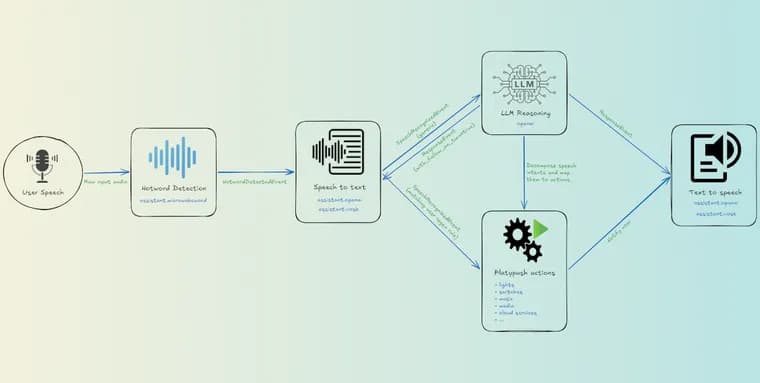
The author of the Platypush blog describes a second rebuild of his self-hosted voice assistant. He had used the pipeline from his previous article, written a couple of months earlier, as his main driver. But after getting used to the robustness of commercial assistants, he was unhappy with its high rates of false positives and false negatives. He was also unhappy with its weak detection of when speech starts and ends, especially in noisy rooms and with cheap microphones. After a bit of experimentation he swapped and tuned a few parts, and after a couple of days of trying the results, he says, are satisfying enough to write about.
The first change is wake word detection. He had used assistant.openwakeword, which wraps openWakeWord. He says it works, but the project has been quiet for a while, and all of its pre-trained models are v0.1 files from 2023, mostly trained on synthetic speech. In practice he got false positives (the hotword triggering on background noise) and false negatives (the hotword not detected unless he was close to the microphone). So he added a new plugin, assistant.microwakeword, built on microWakeWord through the pymicro-wakeword Python bindings. microWakeWord is the engine used by ESPHome and Home Assistant Voice. He says its models are actively maintained, and the built-in ones (okay_nabu, hey_jarvis, hey_mycroft, alexa) ship with the package with no download needed. Custom models work too: drop a microWakeWord JSON manifest and its .tflite model into the plugin's models directory and reference it by name. The plugin exposes the same API as assistant.openwakeword (models, detection_threshold, frame_duration, patience_frames, input_device, input_volume, the list_models action and the same HotwordDetectedEvent), so switching is a configuration change.
He lists several design notes. Without an explicit detection_threshold, each model uses the probability_cutoff from its own manifest (0.9 for alexa), the value the model was validated against. Models already smooth their output over a sliding window, so patience_frames defaults to 0. The audio thread never touches the TFLite models directly. It queues frames and a reset marker to the main thread, because MicroWakeWord.reset() reloads the interpreter and is not safe to call concurrently. Like assistant.openwakeword, the plugin releases the audio device when another assistant plugin starts a conversation and re-acquires it when the conversation ends.
The second change is speech-to-text. assistant.openai records audio when a conversation starts and transcribes it through Whisper. The hard part was always end-of-speech detection. The old implementation took a per-frame boolean from WebRTC VAD, and any single frame classified as speech reset the silence timer. With even a little background noise, phrases ended only when the maximum conversation duration was reached. He reworked AudioPreprocessor, the layer shared by the speech-to-text integrations. Silero VAD, run through onnxruntime with no PyTorch required, is now the primary backend, with WebRTC VAD and a plain RMS-based detector as fallbacks. The backend is chosen automatically in the order silero, webrtc, energy, depending on what is installed. The Silero model is downloaded on first use into the Platypush workdir and checksum-verified. Hysteresis and a sliding window come next: a frame becomes speech above the VAD threshold and stays speech until its score drops by a margin, and per-frame decisions are smoothed by majority vote over a 0.5 second window, so a single noise burst can no longer keep a conversation alive. An adaptive noise floor tracks background level over time, and frames not louder than noise_floor_factor (default 2.0, about 6 dB) times the floor are never treated as speech.
On a synthetic benchmark (Piper-generated phrases mixed with babble and burst noise), the old settings kept conversations open for 6 to 10 seconds after the speech had ended. The new pipeline ends them 1.0 to 1.6 seconds after the last word, which is the configured conversation_end_timeout plus the smoothing lag. Because the work sits in the shared AudioPreprocessor, other speech-to-text plugins benefit too, for example assistant.vosk for fully on-device detection.
The rest of the pipeline is unchanged in outline. The transcribed phrase goes to the openai plugin, which handles the API key and conversation context, and the response is rendered through the configured tts_plugin. If the response ends with a question mark, the conversation continues with a follow-up. Custom hooks can intercept phrases first, for instance to run home automation commands locally without an LLM round-trip, and a HotwordDetectedEvent hook starts the conversation. Responses are rendered by tts.openai. In his tests tts.piper also gave good results and runs entirely locally, but on a Raspberry Pi 5 it added about 3 to 4 seconds of latency compared with tts.openai. Assistant plugins pause hotword detection while a conversation is active, otherwise the assistant would hear itself.
On the code side, assistant.openwakeword also got fixes. Frames are now 80 ms (1280 samples, the size openWakeWord recommends) instead of 500 ms, because longer chunks return only the highest score over their sub-frames and can miss hotwords. It also gained a patience_frames parameter and an explicit detection_threshold parameter with a default of 0.5. A new Silero VAD wrapper handles ONNX inference with recurrent state carried across frames.
He closes with caveats. The microphone on his Raspberry Pi does not support 16 kHz natively, so audio is captured at 44.1 kHz and software-resampled. That works, but if detection feels sluggish, resampling is usually the first suspect. The VAD and threshold defaults were tuned on synthetic audio plus a couple of his own recordings, so other rooms, microphones and acoustics may give different results. He suggests adjusting detection_threshold on the wake word plugin and noise_floor_factor on the speech-to-text plugins if the results disappoint.
Key facts
- A new assistant.microwakeword plugin in Platypush wraps microWakeWord (the engine behind ESPHome and Home Assistant Voice) and exposes the same API as assistant.openwakeword, so switching is a configuration change.
- The author says openWakeWord has been quiet for a while and its pre-trained models are v0.1 files from 2023, which gave him both false positives and false negatives.
- The shared AudioPreprocessor now uses Silero VAD (via onnxruntime), hysteresis, a 0.5 s majority-vote window and an adaptive noise floor (noise_floor_factor default 2.0, about 6 dB).
- On a synthetic benchmark, conversations now end 1.0 to 1.6 seconds after the last word instead of 6 to 10 seconds.
- Defaults were tuned on synthetic audio plus a couple of the author's own recordings, so other rooms and microphones may need adjusted detection_threshold or noise_floor_factor.
Why it matters
Wake word accuracy and knowing when the user has stopped talking are what make a DIY voice assistant feel usable next to commercial ones. The author's complaint was exactly that gap: false triggers, missed hotwords, and conversations that dragged on until the maximum duration because a single noisy frame reset the silence timer. His fix swaps in a maintained wake word engine and replaces the boolean end-of-speech check with smoothed, noise-aware detection. The headline result is a drop from 6 to 10 seconds of dead air to 1.0 to 1.6 seconds, though that figure comes from a synthetic test.
Who it affects
Mainly people who run Platypush on a Raspberry Pi or similar hardware for a self-hosted voice assistant, especially with cheap microphones or in noisy rooms. Users of assistant.openwakeword can move to the new plugin with the same configuration keys. Because the end-of-speech work lives in the shared AudioPreprocessor, users of assistant.openai and assistant.vosk both get it. People who build on microWakeWord in ESPHome or Home Assistant Voice may also find the Python-bindings route useful.
How to use it
Point the configuration at the new plugin: under assistant.microwakeword, list models such as alexa. Built-in models are okay_nabu, hey_jarvis, hey_mycroft and alexa; custom ones need a microWakeWord JSON manifest and a .tflite file in the plugin's models directory. Set vad_backend to auto in assistant.openai to get Silero first, then WebRTC, then an energy detector. The sample setup uses tts.openai with an OpenAI API key, and the author notes that a compatible provider such as a local Ollama instance can be set through base_url. For a fully local setup he points to assistant.vosk and tts.piper, noting that tts.piper added about 3 to 4 seconds of latency on a Raspberry Pi 5. If results disappoint, tune detection_threshold on the wake word plugin and noise_floor_factor on the speech-to-text plugins. If detection feels sluggish on a microphone without native 16 kHz support, suspect the software resampling from 44.1 kHz first.
How solid is it
This is a first-person engineering write-up by the blog's author, not a formal evaluation. He says he tried the setup for a couple of days before writing. The 6 to 10 second versus 1.0 to 1.6 second result comes from a synthetic benchmark of Piper-generated phrases mixed with babble and burst noise. The post gives no false positive or false negative rates for either wake word engine, so the comparison of openWakeWord and microWakeWord is qualitative only. It gives no latency, accuracy or CPU figures for assistant.microwakeword on the Raspberry Pi, and names no Platypush release containing the changes.
Risks and caveats
The author says the VAD and threshold defaults were tuned on synthetic audio plus a couple of his own recordings, so different rooms, microphones and acoustics may give different results. The article does not say that the pipeline is fully local: speech-to-text via Whisper and TTS in the main configuration go through OpenAI (api_key), while tts.piper and assistant.vosk are offered as local alternatives. Local TTS with tts.piper cost about 3 to 4 seconds of extra latency on a Raspberry Pi 5 in his tests. Software resampling on a microphone that does not support 16 kHz is a possible source of sluggish detection.
“A single noise burst can no longer keep a conversation alive.”
— Platypush blog author, on the new hysteresis and sliding-window VAD