Simon Willison builds CORS Chat, a web UI for LLM endpoints
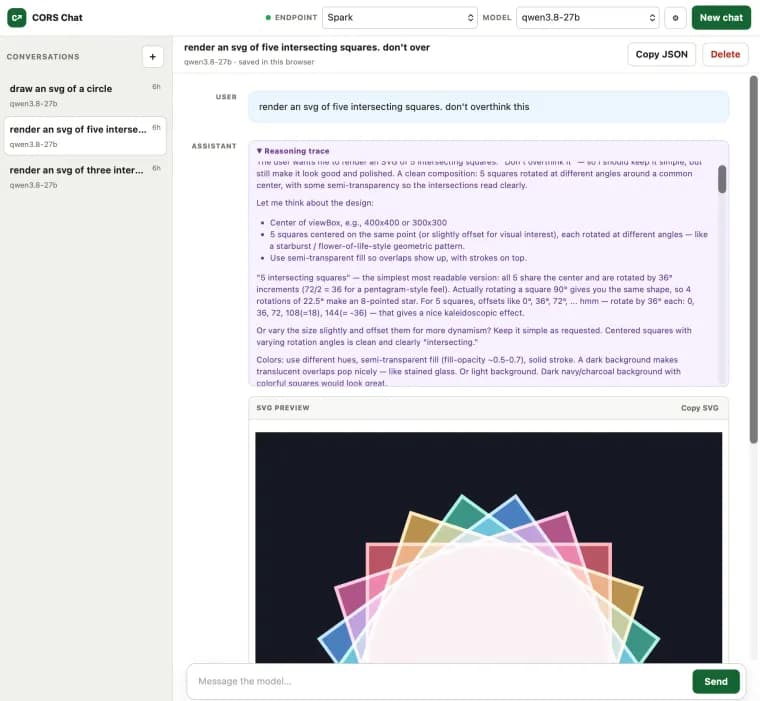
Simon Willison built a small web tool called CORS Chat to help test the Qwen 3.8 27B model running locally in LM Studio, on both his M5 MacBook Pro and an NVIDIA DGX Spark. He built the tool itself using GPT-5.6-Sol set to the xhigh reasoning effort level.
CORS Chat provides a web UI for exercising an OpenAI-Responses-compatible chat endpoint, whatever is serving it. Willison tried it against two different backends, LM Studio (run with its --cors option) and OpenRouter, and reports both worked fine.
The tool keeps conversation history in the browser rather than on a server, and a conversation can be exported as copy-pasted JSON. One detail Willison highlights specifically: CORS Chat notices when a response includes an SVG image being generated and renders it progressively in the chat while the tokens are still streaming in.
Key facts
- Simon Willison built CORS Chat, a web UI for OpenAI-Responses-compatible chat endpoints, using GPT-5.6-Sol at its xhigh reasoning effort setting.
- He built it to test the Qwen 3.8 27B model running in LM Studio on two machines: an M5 MacBook Pro and an NVIDIA DGX Spark.
- CORS Chat works against LM Studio, started with its --cors option, and against OpenRouter; Willison reports both work fine.
- Conversations persist in the browser and can be exported as copy-pasted JSON.
- The tool detects SVG images generated mid-response and renders them progressively in the chat while tokens are still streaming in.
Why it matters
CORS Chat is a narrow, single-purpose release: a web UI for any OpenAI-Responses-compatible chat endpoint, built by Willison in a single day. Its interest lies less in the tool itself, which is a small developer utility, than in what it demonstrates: one consistent browser interface working across a local model server, LM Studio, and a hosted API aggregator, OpenRouter, while testing one specific model, Qwen 3.8 27B, across two different machines, an M5 MacBook Pro and an NVIDIA DGX Spark. It also doubles as a small case study in a coding-capable model building a working tool quickly: Willison used GPT-5.6-Sol, set to its xhigh reasoning effort level, to build CORS Chat itself.
Who it affects
The tool is aimed at developers who run models locally through LM Studio, or who compare a local model against a hosted one through OpenRouter, and would rather use a browser chat client than a command line. Willison built it to solve his own immediate problem: testing Qwen 3.8 27B on two machines he has access to, an M5 MacBook Pro and an NVIDIA DGX Spark. The tool is not limited to that one model, since Willison tested it against two different kinds of backend, a --cors-enabled LM Studio server and OpenRouter, and reports both work.
How to use it
Pointing CORS Chat at LM Studio requires starting the LM Studio server with its --cors option, so a browser page can reach it directly; Willison reports this combination works. Pointing it at OpenRouter, the hosted API aggregator, also works, per his account. Conversations live in the browser rather than on a server, and a conversation can be pulled out by exporting it as copy-pasted JSON.
How solid is it
This is a first-person account, posted on Willison's own blog the same day he says he built the tool, which makes it a reliable primary source for what CORS Chat does and how it was used. It is also the only source: a single report with no external corroboration, no second account confirming that LM Studio and OpenRouter both work as described, or that Qwen 3.8 27B ran successfully through the tool.
Risks and caveats
The retelling rests on a single first-person account with no independent testing or review behind it. The text gives no benchmark results, output samples, or outcome from running Qwen 3.8 27B through CORS Chat, only that the tool was built to test it; whether the model performed well is not stated. It does link directly to the tool, hosted at tools.simonwillison.net/cors-chat, and to a gist of the build transcript, so a reader has a direct path to trying CORS Chat. That LM Studio and OpenRouter both work is the builder's own characterization, with no detail on what testing that judgment rests on.
“One fun detail is that it notices SVG images that are being generated and progressively renders them in the chat while the tokens are still streaming in.”
— Simon Willison