Studio Display XDR with a 2.5G Ethernet adapter cut downloads to 600 Mbps
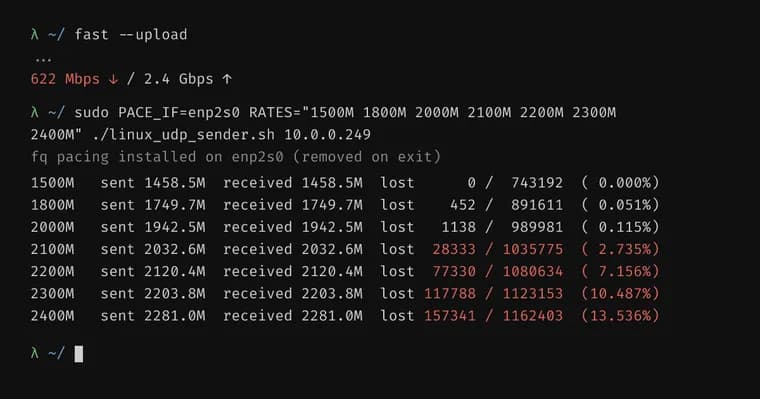
A blogger at blog.tymscar.com has a 2.5 gig symmetrical internet line. One day a speed test on his Mac showed 600 Mbps down, while upload was still 2.4 Gbps. His ISP checked its side and found nothing wrong, and his work laptop showed the same speed. In hindsight the slowdown began when he moved all his connections onto a 2026 Studio Display XDR to get a one-cable setup. He had used it for half a year and never run a speed test through it, so he never noticed he was getting about three quarters less than he paid for. His setup: a MacBook Pro M3 Pro, the display, a UGREEN USB-C to 2.5G Ethernet adapter plugged into the display, and a UniFi Dream Router 7.
The first clues were odd. During a download, pings to other wired computers failed 10% of the time over Ethernet through the adapter in the display, and 0% of the time over Wi-Fi. macOS logged no dropped-frame errors at all, which suggested the adapter was dropping frames before the computer could know. With the adapter plugged straight into the Mac, an iperf3 server on the router gave 2.3 Gbps, and fast.com gave 2.2 down and 2.3 up. Behind the display it fell back to 600 down.
The adapter uses a Realtek RTL8156B chip, which on macOS binds to Apple's generic USB networking driver. Installing Realtek's own driver from its website almost doubled the download speed to 1.1 Gbps, still far from 2.5. Turning on flow control in the UniFi console, which lets a receiver send the sender a "pause" frame, pushed downloads to around 2 Gbps with upload at full speed. The author did not want it always on, because it can add latency to other systems such as his gaming PC, and disabling it on those machines is another thing to remember.
Upload was always fine, and the display's Thunderbolt port gives him much more than 2.5 Gbps from an external SSD, so the port itself can do 2.5 in both directions. To dig further he sent steady UDP traffic from a Linux box on 2.5 gig with flow control off and read the chip's own dropped-frame counter. Connected straight to the Mac, there were essentially no drops. Behind the display, the number of frames handed to the Mac flattened at about 168,000 per second (roughly 2 Gbps), and everything above that was dropped.
The difference he found was bursts. When a Mac reads from a USB 3 device, the device sends some packets and then waits for a go-ahead from the Mac. The SSD enclosure sends 16 packets before it needs one. The RTL8156B sends 4. By the author's own understanding (he says so, with a diagram), the average time to get the go-ahead back through the monitor's hub is around 7.6 µs, and sending 4 KB takes around 8.2 µs. Added together, that caps the adapter-to-Mac rate at around 2 Gbps, while the router pushes 2.5 Gbps in. The adapter's buffer fills and overflows. The dropped packets make the router back off hard when it resends, and that collapses throughput.
He confirmed the pattern with the adapter's own speed setting. Run at 1 gig, the 2.5 gig adapter gave 1 gig downloads with the official driver, at 1.5 it gave 1.5, and at 2 it gave only 1. His other USB-C Ethernet adapters are all 1 gig, so they could not test the range where the problem starts.
So he bought a second UGREEN adapter, a 5G USB-C model that promises 5 Gbps and uses the RTL8157 chip. In the same test it dropped 0 frames. A short Python script reading the USB descriptors showed packet size 1024 for both, with bMaxBurst 3 on the old adapter (4 packets) and 7 on the new one (8 packets). The new adapter sends 8 KB per burst over a link twice as fast, so the time spent sending drops, the go-ahead wait stays the same, and the theoretical maximum from adapter to Mac, wait included, is 4.5 Gbps. That is well above the 2.5 Gbps coming in, so the buffer never fills and nothing drops, even though the go-ahead through the display is still slower than when connected directly.
His conclusion: transfer speed depends on more than link speed in Gbps. It also depends on the Mac's reply time, the number of packets in a burst, and the size and speed of those packets.
Key facts
- With a 2.5 gig line, the author saw 600 Mbps down but 2.4 Gbps up through a Studio Display XDR; plugged straight into the Mac, the same adapter gave 2.2 down and 2.3 up on fast.com.
- The UGREEN 2.5G adapter's Realtek RTL8156B sends 4 packets per USB burst, against 16 for his SSD enclosure. The extra wait for the go-ahead through the display's hub (about 7.6 µs) limits the adapter-to-Mac rate to around 2 Gbps, so frames drop.
- Workarounds: Realtek's own driver raised downloads to 1.1 Gbps, and flow control on the UniFi router raised them to around 2 Gbps, at the cost of possible latency for other devices.
- A UGREEN 5G adapter with the RTL8157 chip sends 8 packets per burst and dropped 0 frames in the same test; the author puts its theoretical adapter-to-Mac maximum at 4.5 Gbps.
- The explanation is the author's own reading of measurements on his single setup, not a vendor statement.
Why it matters
A fast line can be throttled by something nobody checks. The author ran this setup for half a year without noticing the loss, because 600 Mbps felt fast enough. The cause also is not the obvious one. Upload was fine and the display's Thunderbolt port moved an external SSD at well over 2.5 Gbps, so the monitor alone was not to blame. What mattered was the adapter's small burst size (4 packets) combined with the extra delay of waiting for the go-ahead through the display's hub. The author says he could not find an online explanation of this exact cause.
Who it affects
Anyone who plugs a USB-C Ethernet adapter into a Studio Display XDR and has a connection faster than about 2 Gbps. Slower lines would not hit the limit: in the author's tests the trouble began around 2 Gbps, and at 1 and 1.5 Gbps he got full speed. The source tests only the author's own setup, so it does not say how other adapters, displays or hubs behave.
How to use it
The author's fixes, in the order he tried them: install Realtek's own driver from its website (1.1 Gbps instead of 600 Mbps); turn on flow control, which the router or switch must support (around 2 Gbps); or replace the adapter with a UGREEN 5G USB-C Ethernet adapter on the RTL8157 chip, which cut dropped frames to 0. He also shows how to inspect an adapter's USB burst setting: a short Python (pyusb) script prints packet size and bMaxBurst, where the value counts packets after the first, so 3 means 4 packets and 7 means 8.
How solid is it
It is a first-hand debugging write-up with measurements at each step: iperf3, fast.com, ping loss, and the adapter's own dropped-frame counter in a UDP test with flow control off. The before and after with the 5G adapter supports the burst-size explanation. Still, the diagram and the timing arithmetic are, in the author's words, his best understanding, and the 7.6 µs go-ahead delay is his own measurement. No third-party tests are cited.
Risks and caveats
Flow control worked, but the author does not want it always on because it can add latency to other systems, such as his gaming PC. Disabling it on those machines is possible but, in his words, janky. The result comes from one setup (MacBook Pro M3 Pro, 2026 Studio Display XDR, UniFi Dream Router 7), and the source does not say whether Apple or Realtek has been contacted or whether a driver or firmware fix is planned. Fixing it meant buying another adapter.
“I couldn’t find anything online explaining the exact cause, and it’s quite a cool reason.”
— Author of blog.tymscar.com