tamserve runs SAM 2 tracking on many live cameras from one GPU
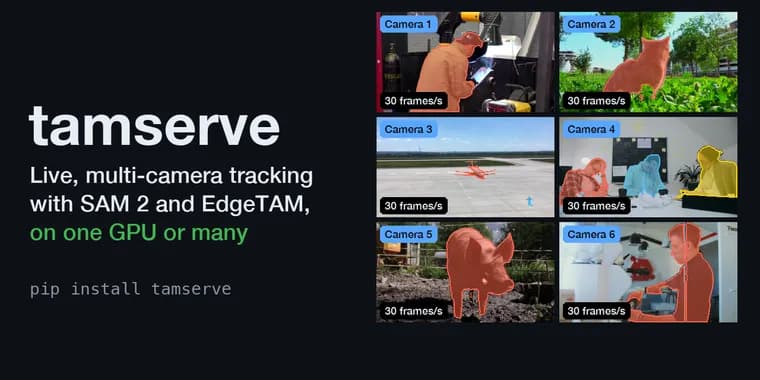
tamserve is a Python project published on GitHub and shown on Show HN. It targets a gap in Meta's video-tracking models. SAM 2 and its smaller relatives, EdgeTAM and SAM 2.1, can outline an object on every frame of a video after you point at it once. But the code that ships with them was written for editing one recorded video, and the usual way to use it on several cameras is a separate copy of the model per camera. The README says memory piles up with every copy and with every minute of video.
tamserve sits between the model and your program. In the README's analogy, it does for video tracking what LLM servers such as vLLM do for chat: every camera shares one copy of the model, and whatever needs the GPU at a given moment goes through it together. The README says this is faster as well as lighter, and that results are the same as the original because the model itself is not touched. The intended users are people who need to know where a thing is, right now, in each video feed: sports and broadcast graphics, warehouse and retail analytics, robotics, wildlife and lab monitoring, and annotation tools. The headline demo is six live cameras on one GPU, each at 30 frames a second.
The figures come from the README. For EdgeTAM on one RTX 4090, tamserve is compared with EdgeTAM's own code at its fastest (compiled, one copy per camera, all sharing the GPU); speeds are totals across cameras with one object each. With eight 720p cameras and one object each, the compiled engine tracks 273 frames a second from video to masks, which is 34 per camera. With 1080p cameras the total is 238. With the larger SAM 2.1 models, tamserve runs at the same speed as Meta's current SAM 2 code and uses about a third of the GPU memory. The full results tables are in a part of the README that was not available to this retelling.
Usage is a pip install (pip install tamserve) and needs Python 3.10 or newer and an NVIDIA GPU. It runs on a CPU, but the README calls that handy for trying it out and much too slow for live video. The first model load downloads weights into ~/.cache/tamserve, pinned to one version and verified before loading; EdgeTAM is 54 MB. tamserve does not open cameras and has no loop of its own. Your program reads frames any way it likes and calls engine.step() once per round with the newest frame from each camera. The README's example uses OpenCV with one reader thread per camera, so the next round's frames are decoded while the GPU tracks the current one. Because each camera keeps only its newest frame, a loop that falls behind skips frames instead of lagging. The engine uploads and resizes frames on the GPU, about half a millisecond a frame against 16 ms when resizing on the CPU.
To start tracking, you pass a name and a box in the current frame to step(). Everything already tracked carries on. engine.drop() stops one object or a whole camera. If an outline drifts onto the wrong person or keeps half an object, pointing again under the same name restarts tracking from the new box and discards the old history. engine.add() starts an object found in the frame you just processed without moving the others forward a second time. Cameras and objects can come and go at any moment.
Two optional add-ons track by name instead of by pointing. Tracker takes a word or phrase such as "dog" or "the red mug", finds every match on every camera, follows each one, picks up new ones and drops those that leave. It pairs two models. Meta's SAM 3 outlines whatever you name and is accurate but slow, about 65 ms for one look at one frame on an RTX 4090. The engine's model cannot find things by itself but follows them cheaply: a few ms a frame with EdgeTAM and a few tens with SAM 2.1 large. So SAM 3 looks at each camera once every three frames, the engine follows in between, and the looks are staggered so they never all land in the same round.
The README compares Tracker with SAM 3's own tracker on one RTX 4090, using 117 videos from Meta's SAM 3 benchmark paired with phrases such as "the white scarf" (224 pairs, none used to choose any setting). On HOTA, the usual tracking score from 0 to 100, Tracker gives up a few points of accuracy and costs two fifths as much, or a quarter with EdgeTAM. It also does three things SAM 3's tracker cannot: run many cameras at once, ask one camera for several things at little extra cost, and keep memory from growing with the video.
PeopleTracker is the same idea tuned for people. Because people move slowly relative to the frame and SAM 3 is sure of them, it looks only once every 15 frames, five times less often than Tracker, and EdgeTAM follows them for about 4 ms a frame. Each person gets a number per camera that persists, including after a brief occlusion. The README says it is both more accurate and far cheaper than SAM 3's own tracker.
Both add-ons need Meta's SAM 3, which is not included by default. You install it with pip install "tamserve[sam3]", run hf auth login once, and accept Meta's licence on the facebook/sam3 page on Hugging Face. The weights are 3.5 GB and are fetched the first time a tracker starts. The README notes that SAM 3 has its own licence, which is not Apache-2.0, and tells readers to read it before building on it.
Key facts
- tamserve is a Python serving engine that lets one copy of Meta's SAM 2, EdgeTAM or SAM 2.1 track objects across many live cameras on one NVIDIA GPU, in the way vLLM serves chat models.
- README figures on one RTX 4090 with the compiled engine: 273 frames a second in total across eight 720p cameras with one object each (34 per camera), and 238 with 1080p cameras.
- With the larger SAM 2.1 models it matches the speed of Meta's current SAM 2 code and uses about a third of the GPU memory, according to the README.
- The optional Tracker and PeopleTracker add-ons find objects by text name using Meta's SAM 3, which has a non-Apache-2.0 licence and gated 3.5 GB weights. Tracker costs two fifths as much as SAM 3's own tracker for a few points of HOTA.
- It does not open cameras or run a loop: your code calls engine.step() once per round with the newest frame from each camera.
Why it matters
SAM 2-style models track objects well, but their reference code assumes one recorded video, so running them on live multi-camera setups has meant one model copy per camera and memory that grows with every copy and every minute of video. tamserve applies the serving-engine idea familiar from LLMs: one shared model copy, with all the cameras' work going through it together. If the README's numbers hold, six to eight live feeds on a single consumer-class GPU becomes practical. The name-based Tracker also lets people ask for "the red mug" instead of drawing boxes.
Who it affects
The README names developers who must answer where a specific thing is in each live video feed: sports and broadcast graphics, warehouse and retail analytics, robotics, wildlife and lab monitoring, and annotation tools. It needs an NVIDIA GPU for live use. Anyone adopting the name-based add-ons also has to accept Meta's SAM 3 licence.
How to use it
Install with pip install tamserve (Python 3.10 or newer, NVIDIA GPU). Build an Engine from build_video_predictor("cuda"), optionally with compile=True, read the newest frame from each camera in your own code, and call engine.step(frames, start) once per round to get a mask per tracked object per camera. Use engine.drop() to stop tracking, point again under the same name to fix a drifting track, and engine.add() to start something found in the frame you just processed. For tracking by name, install pip install "tamserve[sam3]", run hf auth login, and accept Meta's licence on the facebook/sam3 Hugging Face page before the 3.5 GB of weights will download.
How solid is it
All figures are the project's own, measured on one RTX 4090; no independent verification or third-party benchmark is given. The README says the comparison for EdgeTAM is against EdgeTAM's own code at its fastest, which is a fair baseline on its face. The Tracker comparison uses 117 videos from Meta's SAM 3 benchmark (224 video and phrase pairs) and says none were used to choose settings.
Risks and caveats
The 273 and 238 frames a second figures hold only for the stated setup: eight cameras, one object each, an RTX 4090 and the compiled engine. The README itself says a few points of accuracy are traded away by Tracker, and a loop that falls behind skips frames. Tracker and PeopleTracker depend on SAM 3, whose licence is not Apache-2.0 and whose weights are gated. The CPU path is too slow for live video. The detailed results tables and the project's stated limits were not available to this retelling, so memory and accuracy claims beyond those quoted should be checked against the repository.
“tamserve is the serving engine they are missing: one copy of the model tracks every object on every camera, for as long as the cameras run.”
— tamserve README