Windows 11 component records which coding agents and dev tools you run
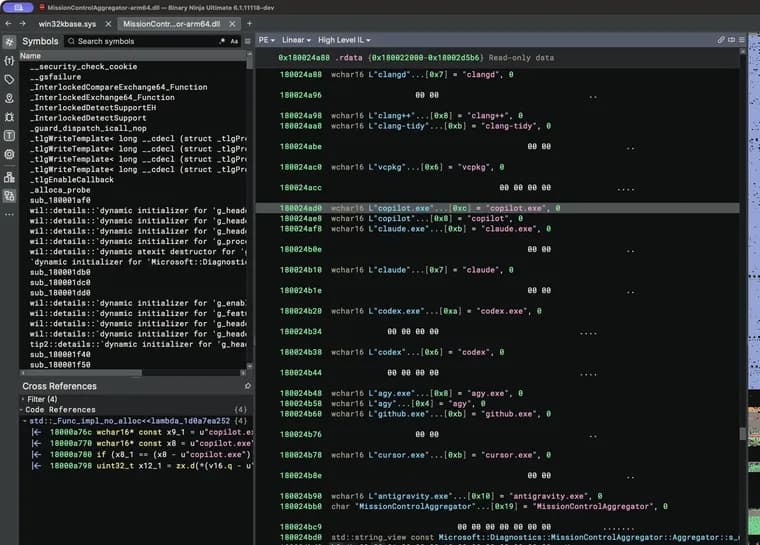
A blog author at xusheng.dev asked an AI assistant to comb recent Windows binaries for undocumented features. One lead stood out: a list of coding-agent executables (codex.exe, claude.exe, copilot.exe, cursor.exe) next to ordinary developer tools (python.exe, dotnet.exe, gcc.exe, code.exe). The names sat in MissionControlAggregator.dll. Following the references in Binary Ninja, the author concluded the DLL belongs to a running Windows component that records which coding agents and developer tools have been used, saves that locally and reports it to Windows Diagnostics. Unless the user has opted out of optional diagnostic data, which is enabled by default, the data is uploaded to Microsoft.
What it checks. Four CLI-agent slots test for copilot.exe, claude.exe, codex.exe and agy.exe, with extensionless equivalents on the WSL route. Five desktop-agent slots test for github.exe, claude.exe, codex.exe, cursor.exe and antigravity.exe. The agent checks are guarded by a feature named CLICodingAgentUsage, feature ID 62580080. The same component also looks for node.exe, python.exe, dotnet.exe, gcc.exe, clang.exe, gdb.exe, javac.exe, devenv.exe and code.exe, among others, feeding broader developer-tool categories. Some checks also verify the publisher: Node.js expects Node.js Foundation, Python expects Python Software Foundation, and the .NET and Visual Studio slots expect Microsoft Corporation. The compiler and debugger group containing GCC and Clang has no extra publisher check in this path.
How it gets the data. The component does not scan processes itself. Aggregator::OnLoad subscribes to existing Windows events: KernelProcess.AppStateChangeSummary and Win32kTraceLogging.AppInteractivitySummary for Windows programs, and Microsoft.Windows.Lxss.Manager.Exec and ExecCritical (using the imageName field) for WSL. So a regular Windows codex.exe can reach the CLI-agent checks; detection is not limited to Linux programs inside WSL. A match sets a slot in the aggregator's state. Later, ReportCohorts<12,4,5> turns the slots into bitsets and emits an ETW TraceLogging event named Segments.SubCohorts. The numbers stand for twelve broader tool categories, four CLI agents and five desktop agents. Each category gets a bit, so the report holds no executable names; a set Codex bit means that tool was seen during the reporting window. The source events also carry runtime, time in focus, interaction counters and resource usage, but the component appears to discard them and keep only the bitmap. The report's timestamps describe the collection window, not how long an agent was used.
Is it live on a normal machine? On the author's Parallels Windows 11 ARM64 VM (build 26200.9974, DLL version 10.0.26100.9818), CLICodingAgentUsage was already enabled as a service experiment without the author turning it on, and DiagTrack (the Connected User Experiences and Telemetry service) was running with startup type Automatic. DiagTrack, process 10148, is the parent of AggregatorHost.exe, process 1500, and that child has the DLL loaded. The public ISO's baseline VM, however, had the coding-agent feature disabled by image default, so the author says the evidence does not support claiming it is active on every Windows installation.
The test. The author copied cmd.exe to a file named codex.exe and ran it. The name alone was enough: the aggregator's saved state set the Codex CLI slot, and after the author moved the saved reporting-window start 25 hours back to force an immediate report and restarted DiagTrack with a trace running, the emitted Segments.SubCohorts event (version 0.1.5, timestamp 2026-11-16T12:34:29.125116Z) showed CliAgentSubCohorts: 4, which is 1 << 2, the Codex CLI bit, and DesktopAgentSubCohorts: 0. A copy of cmd.exe named gcc.exe set developer-tool slot 3; with optional diagnostic data allowed, the resulting event appeared in DiagTrack's upload queue with SubCohorts: [8] (1 << 3), the compiler and debugger category shared by GCC, Clang and related tools.
Where it goes. An ETW event alone does not prove anything leaves the machine, so the author looked for listeners. A Diagtrack-Listener session was already subscribed to both KernelProcess (MatchAnyKeyword=0x400000000002) and Microsoft.Windows.MissionControlAggregator (MatchAnyKeyword=0xe00000000000), both at level 255. Inspecting DiagTrack's EventStore.db and the AsimovEvents table, the author found the Segments.SubCohorts event queued, marked isRequired false, meaning it counts as optional diagnostic data. On a clean Windows 11 Home ARM64 install from the latest official ISO with the region set to the United States, the Diagnostic data toggle was already on and labelled Include Optional before any privacy change, and AllowTelemetry was 3 after setup with defaults. Optional diagnostic data is therefore on by default, at least in that US setup. Users can decline it during setup or turn off Send optional diagnostic data under Settings → Privacy & security → Diagnostics & feedback.
The author found no prompt text or source code in the report, but argues that knowing which agents and developer tools someone uses already has significant privacy implications.
Key facts
- MissionControlAggregator.dll, loaded by AggregatorHost.exe under the DiagTrack service, matches process names of four CLI agents (copilot.exe, claude.exe, codex.exe, agy.exe) and five desktop agents (github.exe, claude.exe, codex.exe, cursor.exe, antigravity.exe), plus tools such as node.exe, python.exe, gcc.exe and code.exe.
- It records a bitmap in a Segments.SubCohorts report, not executable names, runtime or prompt text; the author found no prompt text or source code in it.
- A cmd.exe copy renamed codex.exe produced CliAgentSubCohorts: 4 (the Codex bit); one renamed gcc.exe produced SubCohorts: [8] in DiagTrack's upload queue.
- The event is marked isRequired false. On a clean US-region Windows 11 Home ARM64 install, optional diagnostics were on by default (AllowTelemetry 3), so the report is queued for upload to Microsoft.
- The author's baseline public-ISO VM had the coding-agent feature disabled by default, so the evidence does not show it is active on every Windows installation.
Why it matters
Coding agents have become part of the everyday developer toolchain, and the post shows Windows itself has a component that notices them by name. The finding is that the Windows telemetry path includes a dedicated feature, CLICodingAgentUsage, that flags use of Codex, Claude, Copilot, Cursor and others, and that the resulting report is queued for upload to Microsoft when optional diagnostics are on. The author's own framing is that even without prompts or code, knowing which agents and tools someone uses has significant privacy implications.
Who it affects
Windows 11 users who run coding agents or developer tools, and especially those who left optional diagnostic data at its default. The author confirmed that default only on a clean Windows 11 Home ARM64 install with the region set to the United States; other regions and editions were not covered. The detection covers regular Windows programs as well as the WSL route.
How to use it
To opt out, decline optional diagnostics during Windows setup, or later turn off Send optional diagnostic data under Settings → Privacy & security → Diagnostics & feedback. The author points to Microsoft's diagnostics and privacy guide for changing the setting. To check a machine, the post shows administrative PowerShell commands: Get-Service DiagTrack, Get-Process AggregatorHost, and tasklist /m MissionControlAggregator.dll to see whether the DLL is loaded.
How solid is it
The post is a detailed first-hand investigation backed by disassembly, a captured ETW event and DiagTrack's upload queue contents, with process IDs, versions and the event payload shown. It is a single blogger's work, though, and the tests used renamed copies of cmd.exe, not the real agents. The upload was verified as queued in DiagTrack's upload queue; the source does not show the data being received by Microsoft servers. The source does not say Microsoft has commented, confirmed the purpose of the feature, or announced it.
Risks and caveats
Do not read this as proof that every Windows 11 machine reports agent usage: the author's baseline public-ISO VM had the feature disabled by image default, while the author's ARM64 VM had it enabled as a service experiment without any manual step. The report is a per-category bitmap, so GCC and Clang share one bit, and the component appears to discard runtime and focus time, a hedged reading. The source gives no reason why Microsoft collects this data or how it is used after upload, and no timeline for when the feature or the DLL appeared in Windows. The post is not a statement about intent.
“Although I found no prompt text or source code in this report, collecting which agents and developer tools someone uses already has significant privacy implications.”
— xusheng.dev post author