ChatGPT's Chrome extension can now read your open tabs
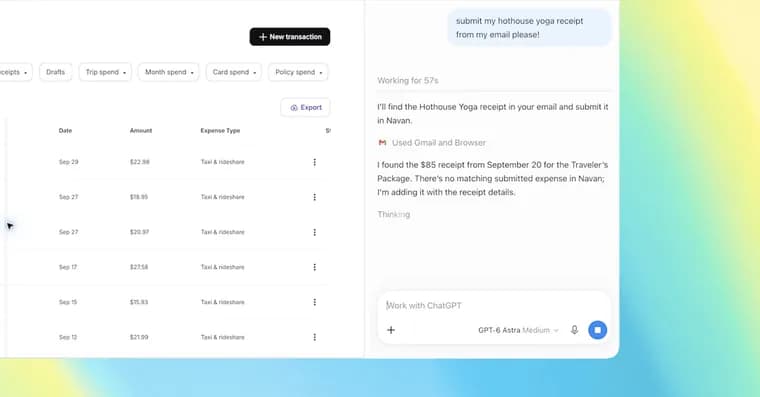
OpenAI has upgraded ChatGPT's Google Chrome extension so that it can work with the browser tabs a user already has open. The article opens by noting that OpenAI's ChatGPT Atlas browser is gone, and that the extension is now getting these upgrades.
With the extension installed, OpenAI says ChatGPT can now view your browser tabs when you tag Chrome in ChatGPT's web or desktop app. OpenAI posted a demo video in which someone asks ChatGPT to compare the three tabs they have open with sofas they are considering. The article's caption puts it simply: with the extension, ChatGPT can pull information from your open tabs or be brought into the sidebar.
OpenAI listed several sample queries for the upgraded add-on. One asks ChatGPT to use the details in an event brief to fill out a registration form, and to stop before submitting. Another asks it to put the vendors in a set of tabs into a comparison sheet, with pricing, key features and source links. A third asks it to look at all open tabs, compare contractor services, and draft an email to the one that fits a home renovation. A fourth asks it to fill out a form open in @chrome ahead of a visit to a new dentist, and to add the appointment to work and personal calendars.
The sidebar has been updated too. It now offers "the full power of ChatGPT" and the user's entire conversation history in Chat or Work, usable without leaving the page being viewed. The update also enables ChatGPT Work to "control" Chrome tabs for tasks like "sending messages, filling out forms, or downloading files," similar to Google's Gemini-powered "auto browse" feature. ChatGPT Work can also organize or group open tabs.
Key facts
- With the ChatGPT extension installed, OpenAI says ChatGPT can view your open Chrome tabs when you tag Chrome in ChatGPT's web or desktop app.
- OpenAI's demo video shows ChatGPT comparing three open tabs with sofas the user is considering.
- The refreshed sidebar gives ChatGPT access to the user's entire conversation history in Chat or Work, without leaving the current page.
- ChatGPT Work can now "control" Chrome tabs (sending messages, filling out forms, downloading files) and organize or group open tabs, similar to Google's Gemini-powered "auto browse".
- The article notes that OpenAI's ChatGPT Atlas browser is gone.
Why it matters
OpenAI is bringing ChatGPT into the browser people already use rather than asking them to switch. The article frames the upgrade against the fact that OpenAI's ChatGPT Atlas browser is gone. The tab control for ChatGPT Work is likened to Google's Gemini-powered "auto browse" feature, so the extension puts ChatGPT in the same territory as Google's browser agent.
Who it affects
Anyone who uses ChatGPT alongside Google Chrome. OpenAI's sample queries point to everyday tasks: comparing products or contractors across tabs, collecting vendor details into a spreadsheet, filling out registration or medical forms, and drafting emails or calendar entries from what is already open.
How to use it
Install the ChatGPT extension for Chrome, then tag Chrome in ChatGPT's web or desktop app to let ChatGPT see your open tabs. You can also open ChatGPT in the sidebar to use your full conversation history in Chat or Work on the page you are viewing. Sample prompts from OpenAI include "Put the vendors in these tabs into my comparison sheet, with pricing, key features, and source links." The source does not say which subscription plans or tiers get the upgraded extension, or what it costs, and gives no release date, rollout schedule or regional availability.
How solid is it
The feature set comes from OpenAI's own announcement, including its demo video and sample queries, as relayed by the article. The article describes what the update does but reports no independent testing, and gives no performance, accuracy or safety figures. The claim that Atlas is gone is stated in the article's own voice, and the source does not explain why or when it was discontinued.
Risks and caveats
Letting ChatGPT "control" tabs means it can send messages, fill out forms and download files on the user's behalf, so mistakes could have real effects. One of OpenAI's own sample prompts tells ChatGPT to stop before submitting a form. The source gives no privacy, permission or data-handling details for ChatGPT reading open tabs, does not say what ChatGPT Work is beyond the mentions of Chat or Work, and does not say whether other browsers are supported or planned.
“the full power of ChatGPT”
— The article, describing the updated ChatGPT sidebar in Chrome