Gradio adds gr.Workflow, a drag-and-drop AI pipeline builder
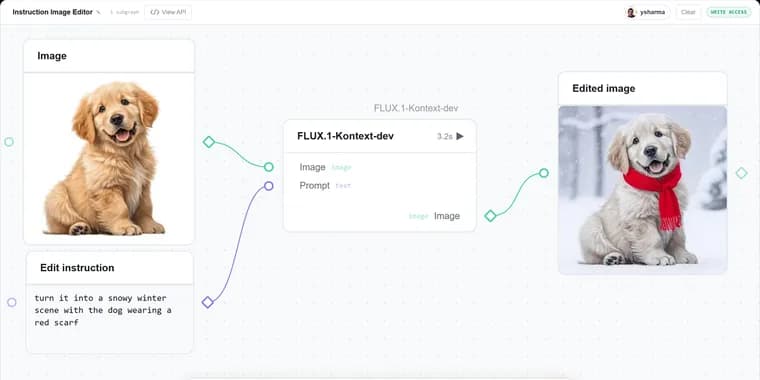
Hugging Face has added gr.Workflow to its Gradio library, a feature that turns pipeline building into a visual, drag-and-drop task. A workflow is a graph made of three kinds of nodes: references (inputs), operators (the steps that do work), and subjects (outputs). You connect them by dragging between typed ports, then run the graph and watch each intermediate result appear in place. An operator can be a plain Python function, a call to a model on Hugging Face Inference Providers, another Gradio Space, or a row pulled from a Hub dataset.
Hugging Face illustrates the feature with several live, duplicable Spaces. A single-node app edits a photo by calling Qwen-Image-Edit through Inference Providers: upload an image, type an instruction such as "turn it into a snowy winter scene," and get the edited photo back. A media-studio workflow chains a prompt into three parallel outputs on one canvas: FLUX generates a base image that a background-removal Gradio Space turns into a sticker, the same topic becomes a voiceover through a text-to-speech Space, and an LLM call writes a matching episode title. That one canvas makes two model calls through Inference Providers and two calls to Gradio Spaces, and because it is a workflow, each of the three outputs gets its own REST endpoint (/sticker, /voiceover, /episode_title) that can be called directly from code. A separate fan-out example takes a single idea and generates a base FLUX image plus two AI re-imaginings of it (a soft watercolor version and a neon cyberpunk take) together with an LLM-written gallery title, all in parallel. A dataset-profiling workflow takes one Hugging Face dataset ID and fans it out to four operator nodes that analyze the dataset live through the Datasets Server API, returning an overview card, a row preview, per-column statistics, and a distribution chart at once.
Workflows are not limited to hosted models. Because an operator can be plain Python, a function decorated with @spaces.GPU can run a model on a GPU inside the Space itself: when that node runs, ZeroGPU allocates a GPU for the call, runs the model, and releases it afterward, so the workflow does not have to rely on Inference Providers or existing Gradio Spaces. One demo uses this to animate a still image with Lightricks/LTX-Video loaded through Diffusers, running entirely inside one node.
Every workflow is also an API with no extra work: each output becomes a REST endpoint named after its label, callable from Python with the Gradio client or over plain HTTP with curl. In a live, no-token example against a demo Space, client.predict("hello there friend", api_name="/word_count") returns 3 and client.predict(20, api_name="/fahrenheit") returns 68.0. Endpoints that call a model or a Space instead run under a Hugging Face token, passed when the client is created. Building a workflow from scratch is as short as writing a Python function and calling gr.Workflow(bind=[your_function]).launch(), or duplicating any of the demo Spaces and rewiring it. Hugging Face says a follow-up post will walk through building something as involved as AUTOMATIC1111 with gr.Workflow.
Key facts
- gr.Workflow graphs are built from exactly three node types: references (inputs), operators (the steps that do work), and subjects (outputs).
- A media-studio example workflow makes two model calls through Hugging Face Inference Providers and two calls to Gradio Spaces on one canvas, producing a sticker, a voiceover, and an episode title, each exposed as its own REST endpoint.
- A dataset-profiling workflow fans a single Hugging Face dataset ID out to four operator nodes that analyze the dataset live via the Datasets Server API.
- Functions decorated with @spaces.GPU let ZeroGPU grab a GPU for that node's call, run the model, and release it, so a workflow does not have to depend on Inference Providers or Gradio Spaces.
- Every workflow doubles as a REST API automatically: calling client.predict("hello there friend", api_name="/word_count") on a live demo Space returns 3.
Why it matters
Gradio already lets developers spin up a UI for a single model call in a few lines of Python. gr.Workflow extends that to multi-step pipelines: instead of hand-wiring several model calls, Spaces, and Python functions together and then separately writing an API layer, a developer drags nodes onto a canvas and gets a working, inspectable pipeline where every intermediate result is visible, plus a REST API and a Hugging Face Spaces deployment for free.
Who it affects
It targets people building on Hugging Face's stack: developers assembling AI demos or internal tools out of several models or Spaces, and anyone who wants to turn a chain of Inference Providers calls, existing Gradio Spaces, or GPU-bound Python functions into something both a person and other code can call, without maintaining a separate API layer by hand.
How to use it
A workflow is defined by binding Python functions and running gr.Workflow(bind=[your_function]).launch(); operators can also be Inference Providers model calls, other Gradio Spaces, or Hub dataset rows, wired together by dragging between typed ports. A function that needs its own GPU is decorated with @spaces.GPU so ZeroGPU allocates and releases a GPU for that call. Every output becomes a named REST endpoint, callable with the Gradio client (client.predict(..., api_name="/name")) or plain curl, with a Hugging Face token required for endpoints that call a model or a Space. The fastest way in is to open one of Hugging Face's demo Spaces and click Duplicate to start rewiring it.
How solid is it
The description comes from Hugging Face's own blog post announcing the feature as built directly into Gradio, illustrated with several live, duplicable Hugging Face Spaces and a runnable, no-token code example whose outputs are shown. No release date or version number is given, and no individual author is named on the post.
Risks and caveats
The post gives no benchmark or comparison against other workflow or pipeline-building tools, and no pricing or cost information for the Hugging Face Inference Providers or Spaces the workflows call. As an official product announcement, it describes what the feature is designed to do without independent testing of how it performs at scale or under load.
“gr.Workflow doesn't need to know anything about your GPU setup. It simply calls the bound function.”
— Hugging Face, Gradio blog