Meta adds 'spaces' to its Muse AI app for custom, app-like views
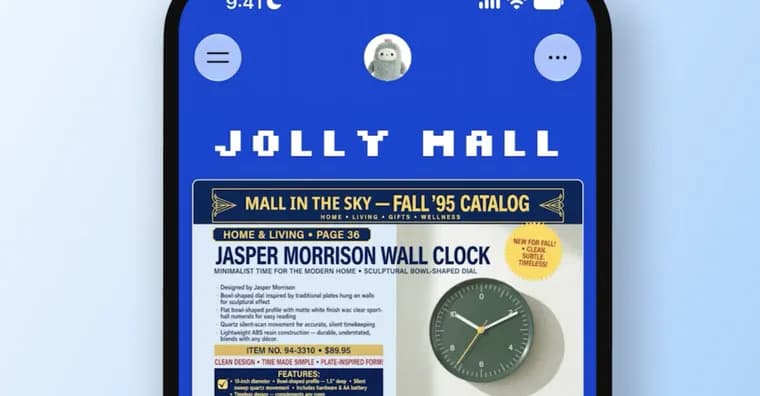
Meta has added a feature called "spaces" to Muse, its AI assistant and app. Spaces let the assistant build app-like experiences that users interact with directly inside Muse. Meta's examples are a shopping hub, a school dashboard, a music tracker and a trivia game, "and more".
Per Meta, a new space is created by describing it. If a user connects an outside app to Muse, such as Gmail, Google Calendar, OpenTable or Notion (the list is "and others Muse works with"), the assistant will continuously pull information from those apps. That lets it update pricing, dates and other information in a space in the background. Users can also work inside a space by checking things off, adding notes and making edits.
Placement is adjustable. Meta lets users keep spaces in the sidebar, move them into the main tab, or schedule when they appear. Meta's example: "keep your weekly planner up front during the workweek, then swap it for your weekend plans on Saturday."
Separately, Meta announced that it is bringing new "Active Memory" and "Active Focus" capabilities from its Muse Wonder AI model into the Muse app and its Meta AI chatbot. According to the report, this will allow Muse to understand when past information becomes relevant during conversations, and make it better at working toward goals.
Meta is rolling out spaces to all Muse users. The company is also looking into ways to share spaces with other users and collaborate on them; that is not yet available.
Key facts
- Muse, Meta's AI assistant and app, gains "spaces": app-like experiences the assistant builds, such as a shopping hub, school dashboard, music tracker or trivia game.
- Per Meta, a new space is created by describing it; connected apps like Gmail, Google Calendar, OpenTable and Notion let the assistant update pricing, dates and other details in the background.
- Spaces can be edited by hand (checking things off, adding notes) and placed in the sidebar or main tab, or scheduled to appear at set times.
- Meta is also bringing "Active Memory" and "Active Focus" from its Muse Wonder model into the Muse app and the Meta AI chatbot.
- Spaces are rolling out to all Muse users; sharing and collaboration are only being looked into.
Why it matters
Instead of only answering questions, Muse can now produce a lasting, personal interface for a task, built from a description and kept current from connected apps. That moves the assistant toward the territory of small custom apps. The Active Memory and Active Focus additions, taken from Muse Wonder, are meant to make Muse notice when past information becomes relevant and work better toward goals.
Who it affects
All Muse users, since Meta is rolling spaces out to everyone. Meta's examples point to everyday uses: shopping, school, music, games and weekly planning. Users of the Meta AI chatbot are also affected by the Active Memory and Active Focus capabilities.
How to use it
Describe the space you want and Muse builds it. To keep it current, connect outside apps such as Gmail, Google Calendar, OpenTable or Notion, and the assistant will pull information from them in the background. Inside a space you can check items off, add notes and edit. You can keep a space in the sidebar, move it to the main tab, or schedule when it appears, for instance a weekly planner on weekdays and weekend plans on Saturday. No pricing, subscription tier, platform or region availability is stated.
How solid is it
The account comes from The Verge's report on Meta's announcement; the setup and behaviour are described by Meta and the outlet, not independently tested. No date or timescale is given for the rollout beyond "is rolling out" to all Muse users. No numbers (users, performance, benchmarks) are given. The source does not say which model powers spaces.
Risks and caveats
Sharing and collaboration on spaces are only being looked into, with no timeline given. The full set of supported outside apps is not listed beyond Gmail, Google Calendar, OpenTable and Notion "and others". The Active Memory and Active Focus benefits are stated as what the capabilities will allow, not as measured results. Connecting outside apps means the assistant continuously pulls information from them.
“For example, keep your weekly planner up front during the workweek, then swap it for your weekend plans on Saturday”
— Meta